- React.js is a declarative, efficient, and flexible JavaScript library for building user interfaces. It lets you compose complex UIs from small and isolated pieces of code called components.
- React manages the creation and updating of DOM nodes in your Web page
npx create-react-app <app-name>
| Folder | |
|---|---|
src |
Folder where we put all of the source code we write |
public |
Folder that stores static files, like images, or a HTML file |
node_modules |
Folder that contains all of our project dependencies |
package.json |
Records our project dependencies and configures our project |
package-lock.json |
Records the exact version of packages that we install |
README.md |
Instructions on how to use this project |
In the project directory, you can run:
- Runs the app in the development mode.
- Open http://localhost:3000 to view it in the browser.
- The page will reload if you make edits.
- You will also see any lint errors in the console.
- Launches the test runner in the interactive watch mode.
- See the section about running tests for more information.
- Builds the app for production to the
buildfolder. - It correctly bundles React in production mode and optimizes the build for the best performance.
- The build is minified and the filenames include the hashes.
- Your app is ready to be deployed!
See the section about deployment for more information.
Note: this is a one-way operation. Once you eject, you can’t go back!
-
If you aren’t satisfied with the build tool and configuration choices, you can
ejectat any time. This command will remove the single build dependency from your project. -
Instead, it will copy all the configuration files and the transitive dependencies (Webpack, Babel, ESLint, etc) right into your project so you have full control over them. All of the commands except
ejectwill still work, but they will point to the copied scripts so you can tweak them. At this point you’re on your own. -
You don’t have to ever use
eject. The curated feature set is suitable for small and middle deployments, and you shouldn’t feel obligated to use this feature. However we understand that this tool wouldn’t be useful if you couldn’t customize it when you are ready for it.
import React from 'react';
import ReactDOM from 'react-dom';- JSX is a short form of JavaScript Extended and it is a way to write React components. Using JSX, you get the full power of JavaScript inside XML like tags.
- You put JavaScript expressions inside
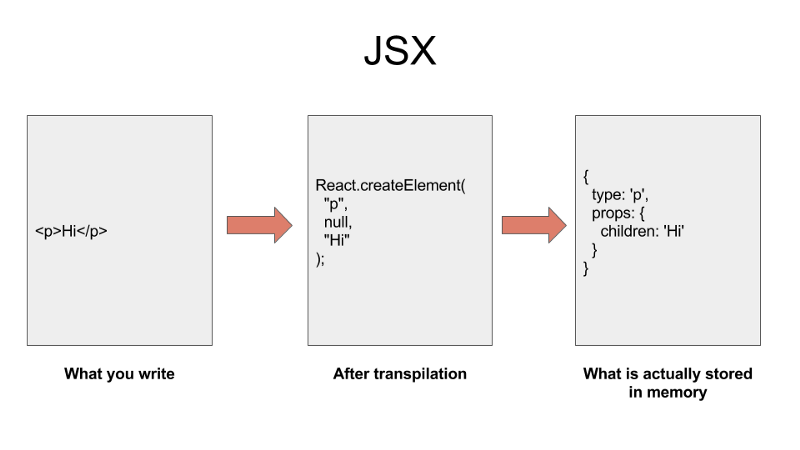
{}.- The way it works is you write JSX to describe what your UI should look like. A transpiler like
Babelconverts that code into a bunch ofReact.createElement()calls.
 - The React library then uses those `React.createElement()` calls to construct a tree-like structure of DOM elements (in case of React for Web) or Native views (in case of React Native) and keeps it in the memory.
- The way it works is you write JSX to describe what your UI should look like. A transpiler like

<a class="nav-link" href="/home">
  <img src="home">
  Home
</a>const navList = (
<ul>
<li className="selected">
<a href="/pets">Pets</a>
</li>
<li>
<a href="/owners">Owners</a>
</li>
</ul>
);- Note: in JSX classes are referred to as
className
- React applications are built as a combination of parent and child components. As the names suggest, each child component has a parent and a parent component will have one or more child components.
- A component is a reusable piece of code, which defines how certain features should look and behave on the UI
const App = () => {
  return <div>Hi there!</div>;
};- Take the react component and show it on the screen
ReactDOM.render(<App />, document.querySelector('#root'));

-
- A functional component in React consumes arbitrary data that you pass to it using
propsobject. It returns an object which describes what UI React should render. - Functional components are also known as Stateless components.
- You must return something from a function component. You cannot return undefined from a function component. If you don't want to render anything, then return null instead.
const App = (props) => {

  return <div></div>;
};
- A functional component in React consumes arbitrary data that you pass to it using
-
- The class-based component has an additional property
state, which you can use to hold a component’s private data. - Since these components have a state, these are also known as Stateful components.
- We extend
React.Componentclass of React library to make class-based components in React. - The
render()method must be present in your class as React looks for this method in order to know what UI it should render on screen.
class App extends React.Component {
  constructor(props) {
    super(props);
  }

  render() {
    return <div></div>
  };
}
- We extend
- The class-based component has an additional property

- all of these functions have the same result as the
useEffecthook
-
Components receive data via an argument traditionally named
props. -
React elements can accept
propsfrom its parent or from wherever it is created or rendered.propsis an object that gets passed down from the parent function component into the child function component. - The keys of thepropsobject passed into a function component is defined in the same way as an HTML attribute -
- A component takes in parameters, called
props(short for “properties”), and returns a hierarchy of views to display via therendermethod.- The
rendermethod returns a description of what you want to see on the screen. React takes the description and displays the result.
- The
class ShoppingList extends React.Component {
  render() {
    return (
      <div className="shopping-list">
        <h1>Shopping List for {this.props.name}</h1>
        <ul>
          <li>Instagram</li>
          <li>WhatsApp</li>
          <li>Oculus</li>
        </ul>
      </div>
    );
  }
}

// Example usage: <ShoppingList name="Mark" />
- A component takes in parameters, called
-
Here,
ShoppingListis a React component class, or React component type. -
The
<div />syntax is transformed at build time toReact.createElement('div'). -
Example above is equivalent to:
return React.createElement('div', {className: 'shopping-list'},
  React.createElement('h1', /* ... h1 children ... */),
  React.createElement('ul', /* ... ul children ... */)
);-
React.PureComponentis similar toReact.Component. The difference between them is thatReact.Componentdoesn’t implementshouldComponentUpdate(), butReact.PureComponentimplements it with a shallow prop and state comparison.
- To render a function component in another function component, wrap the desired nested function component in JSX tags just like you would a regular HTML tag in the return of the outer function component.
function NavLinks() {
  return (
    <ul>
      <li className="selected">
        <a href="/pets">Pets</a>
      </li>
      <li>
        <a href="/owners">Owners</a>
      </li>
    </ul>
  );
}

function NavBar() {
  return (
    <nav>
      <h1>Pet App</h1>
      <NavLinks />
    </nav>
  );
}
- The
NavBarcomponent is the parent of theNavLinkscomponent, which meansNavBaris rendering theNavLinkscomponent as its child.
- The
function NavBar() {
  const world = "world"
  return (
    <nav>
      <h1>Pet App</h1>
      <NavLinks hello={world} />
    </nav>
  );
}NavLinkswill know that thepropskey ofhellohas a value ofworld- React will invoke the
NavLinksfunction with thepropsobject as the first argument.- This is true for any function component. This means that you can expect the first parameter of a function component to be an object that has its keys and values determined by the parent component.
- Destructuring
propscan help make code more readable - You can explicitly define which
propsthe child component should be expecting by destructuring thepropsobject in the function component's parameter.
function NavLinks({ hello, color }) {
  return (
    <ul>
      <li>
        <a href="/hello">{hello}</a>
      </li>
      <li className="selected">
        <a href="/pets">Pets</a>
      </li>
      <li>
        <a href="/owners">Owners</a>
      </li>
    </ul>
  );
}
State is a JavaScript object that contains data relevant to a component
- State is similar to
props, but it is private and fully controlled by the component.propsdon't change over time, butstatedoes. - State must be initialized when a component is created
- Updating
stateon a component causes the component to (almost) instantly rerender- State can only be updated using the function
setState
- State can only be updated using the function
- Only usable with class Components
class App extends React.Component {
  constructor(props) {
    super(props);

    this.state = { obj: null };

    window.function(
      object => {
        this.setState({ obj: object });
      }
    )
  }

  render() {
    return <div>Object: {this.state.obj}</div>
  };
}| Chain of actions | |
|---|---|
| 1. | JS file loaded by browser |
| 2. | Instance of App component is created |
| 3. | App components 'constructor' function gets called |
| 4. | State object is created and assigned to the this.state property |
| 5. | React calls the components render method |
| 6. | App returns JSX, gets rendered to page as HTML |
In order to use state in function components, you need to import useState from React
import { useState } from 'react';- While props are immutable, state changes over time. With every change to state, react will re-render the component.
- The
useEffecthook lets your perform side effects in your function components.
- React also provides a component for rendering multiple elements without a wrapper.
- The
React.Fragmentcomponent lets you return multiple elements in arender()method without creating an additional DOM element:
render() {
  return (
    <React.Fragment>
      Some text.
      <h2>A heading</h2>
    </React.Fragment>
  );
}
- The
-
Each JSX element is just syntactic sugar for calling
React.createElement()React.createElement( type, [props], [...children] )
- Create and return a new React element of the given type.
- The type argument can be either a tag name string (such as
divorspan), a React component type (a class or a function), or a React fragment type.
- The type argument can be either a tag name string (such as
React.createFactory(type)
- Return a function that produces React elements of a given type.
- Like
React.createElement(), the type argument can be either a tag name string (such asdivorspan), a React component type (a class or a function), or a React fragment type.
- Like
- Create and return a new React element of the given type.
React.cloneElement(
  element,
  [props],
  [...children]
)- Clone and return a new React
elementusing element as the starting point.- The resulting element will have the original element’s props with the new props merged in shallowly.
- New children will replace existing children.
keyandreffrom the original element will be preserved.
React.isValidElement(object)- Verifies the object is a React element. Returns
trueorfalse.
React.Children.map(children, function[(thisArg)])React.Childrenprovides utilities for dealing with thethis.props.childrenopaque data structure- Invokes a function on every immediate child contained within
childrenwith this set tothisArgAdditionalchildrenfunctions
- Invokes a function on every immediate child contained within