




🧹 Free up disk space by cleaning caches, temp files, app leftovers, and more. Everything goes to Trash — nothing is gone forever unless you say so.
🌍 Fully Localized — English, Русский, Українська, Español. All UI, errors, logs, and system info translated dynamically. Dates and byte counts format automatically for your language.
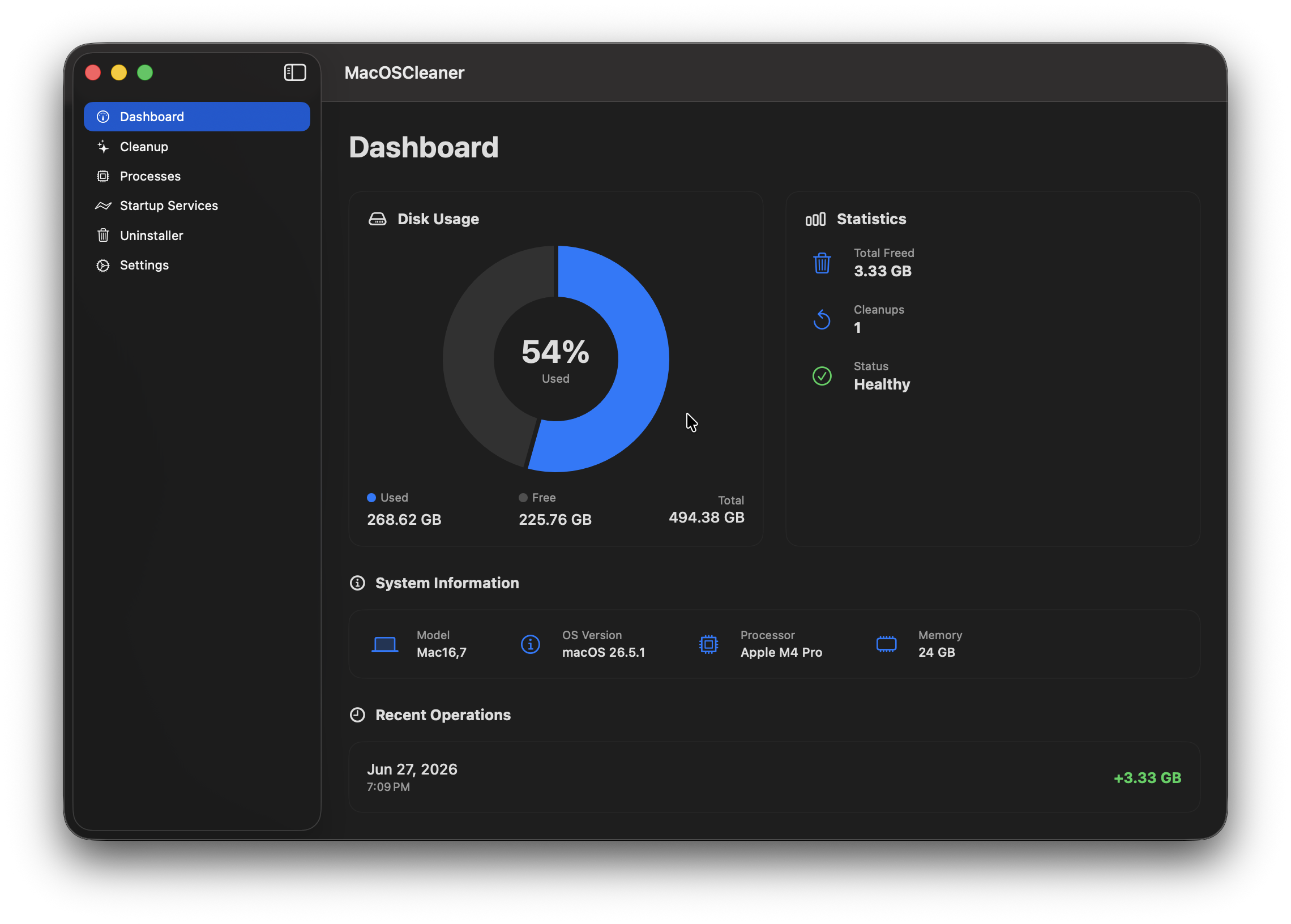
Dashboard 📊 — redesigned with native macOS aesthetics: controlBackgroundColor, rounded cards, and SF Symbols. Disk usage chart, system info (model, CPU, RAM, macOS version), cleanup history and stats.
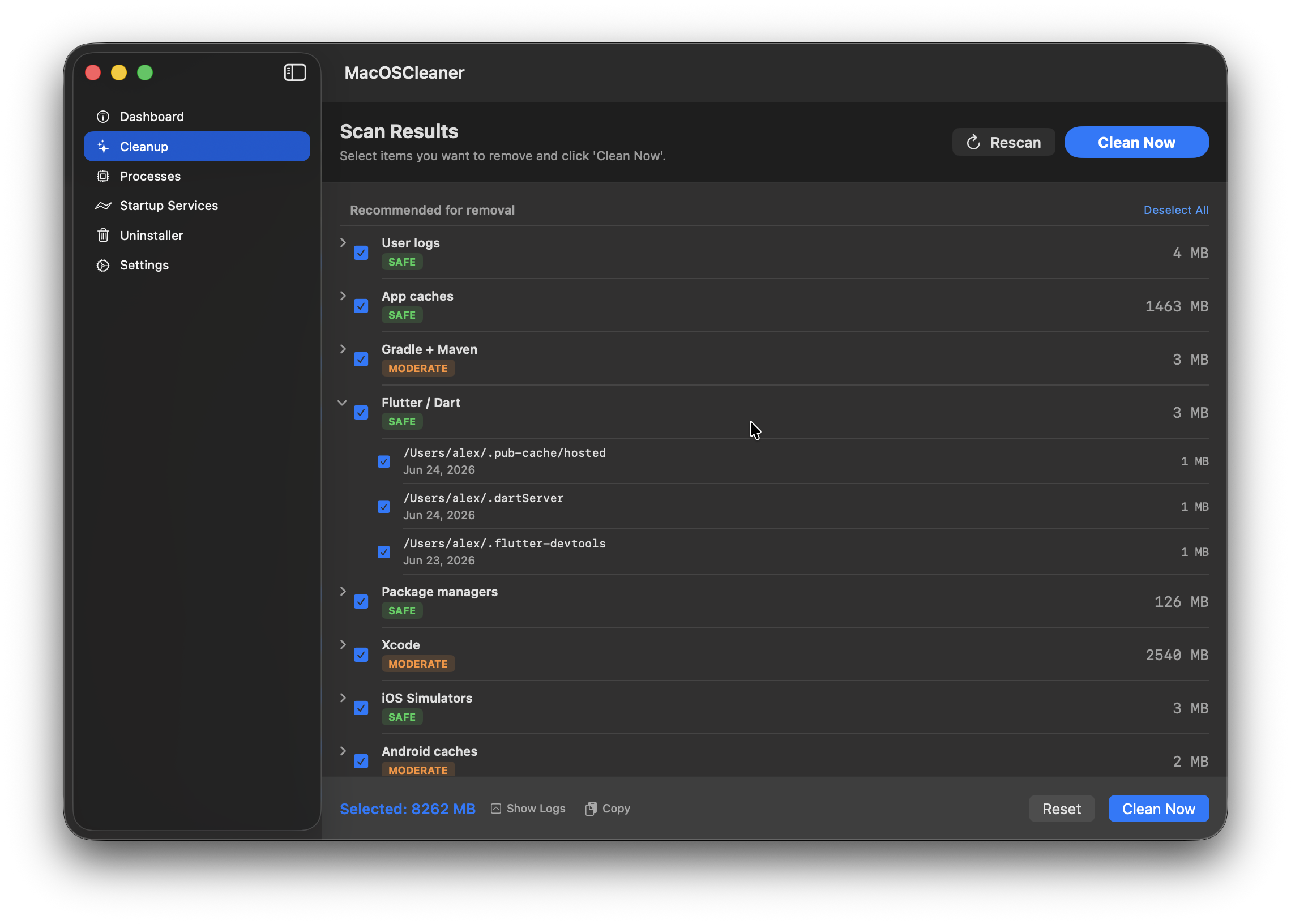
Smart Cleanup 🔍 — scans 54 categories with 298 built-in cleaning paths:
- App Caches — Google, Spotify, JetBrains, opencode, browsers (Safari, Chrome, Firefox, Edge, Brave, Vivaldi, Arc), messengers (Telegram, Discord, Slack, Signal, WeChat, Teams)
- Package Managers — Homebrew, npm, yarn, pnpm, CocoaPods
- Dev Tools — Xcode DerivedData, iOS Simulators (old runtimes too), Android SDK + Studio caches, Gradle/Maven, Flutter/Dart, language caches (Go, Rust, Python, Node.js, Ruby, Java, Julia, Elixir, Haskell, Swift PM, R, Maven, pnpm-store, Yarn, Poetry, Cargo git, SwiftPM repos, Bazel)
- IDE Caches — Cursor, VS Code (incl. Insiders), Windsurf, Zed, JetBrains, Nova, Sublime Text, Atom, Eclipse, opencode, Claude, ChatGPT, Gemini, Perplexity, GitHub Desktop, Slack, Discord, Figma, Notion, Postman, Insomnia, Linear, Tower, TablePlus + dynamic Electron cache discovery
- Browser Sub-Caches — Firefox Profiles/*/cache2, Safari LocalStorage/Databases, Chrome Code Cache/GPUCache/Service Worker/GrShaderCache, Edge/Brave/Arc Code Cache
- System Caches — QuickLook ThumbnailsAgent, fonts, Spotlight, Siri, CloudKit, TimeMachine, icons
- Docker — container and image cleanup
- App Containers — sandboxed caches in Containers + Group Containers
- Dotfile Caches — AI CLI tools (opencode, Claude, Gemini, Codex, Aider), dev tools (npm logs, Terraform, Helm, Bazel, ccache, vcpkg)
- Scattered Junk — .DS_Store, __MACOSX, stray logs, Windows metadata (Thumbs.db, desktop.ini), broken symlinks
- Orphaned Files — leftovers from uninstalled apps in HTTPStorages, WebKit, Cookies, /Users/Shared
- Old IDE Versions — cleans system caches for VS Code, Cursor, Windsurf, Zed, Sublime Text, Eclipse, Atom; detects and removes leftover JetBrains cache/log directories for no-longer-installed products; cleans old Android Studio version caches (keeps latest); removes stale CachedData subdirectories for VS Code, Cursor, Windsurf (keeps latest version)
- Large Files — old DMG/pkg/iso/zip installers, node_modules (recursive), iPhone backups, IPSW firmware
- Dynamic Cache Discovery — auto-discovers large reverse-DNS caches in ~/Library/Caches; Apple caches (com.apple.*) at ≥ 5 MB, others at ≥ 20 MB
- Time Machine Snapshots — local APFS snapshots (macOS recreates them automatically)
- iOS Backups — re-downloadable from iCloud
- Mail Downloads — cached email attachments (all Mail accounts)
- Saved Application State — window/session state (recreated on app launch)
- Crash Reports — old crash logs and diagnostic files
- AssetsV2 / iWork Templates — Pages/Numbers/Keynote templates (~800 MB, re-downloaded on demand)
- iCloud CloudKit Cache — metadata cache (rebuilt automatically)
- SwiftPM Cache — build/download cache (rebuilt on next build)
- Carthage Cache — dependency cache and spec repos
- Steam Cache — app cache, shader cache, depot cache, logs
- Teams Cache — Electron caches (Cache, Code Cache, GPUCache, IndexedDB)
- Adobe Caches — application and media caches
- Chrome Extra Caches — GrShaderCache, disk cache, code cache, GPU cache, service workers
- Launch Agents — user-level LaunchAgents in ~/Library/LaunchAgents
- Launch Daemons — system-level LaunchDaemons (sudo)
- Privileged Helpers — system helper tools (sudo)
- Package Receipts — pkgutil receipt databases
- Internet Plug-Ins — legacy browser plug-ins
- Shared File Lists — Finder sidebar / recent items lists
- iCloud Cloud Documents — iCloud document cache (opt-in)
- Photos Library Cache — Photos.app library cache
- Voice Memos — Voice Memos recordings (opt-in)
- GarageBand / Logic — project files and caches (opt-in)
- iMovie / Final Cut — render files and libraries (opt-in)
- Garmin / Fitbit — device sync caches
- Old Backups — stale .backup files in Home, Desktop, Documents, Downloads
- DNS Cache Flush — flushes DNS resolver cache (command, sudo)
- Font Cache — rebuilds font databases (command, sudo)
- Sleep Image — removes /var/vm/sleepimage (command, sudo, opt-in)
- Duplicate Files — sha256 duplicate detection in ~/Documents, ~/Desktop, ~/Downloads, ~/Pictures, ~/Movies
- Unused Apps — apps not launched in 180+ days (scan-only)
Cleanup tasks run in parallel across all available cores for maximum speed. All categories are always scanned. Dev-related ones show a purple "DEV" badge. Risk badges (Safe / Moderate / Dangerous / Protected) appear after scan — you pick what to delete, then confirm.
Cleanup Options — toggles before scan:
- Clean .DS_Store files — removes Finder metadata from directories (off by default)
- Clean iCloud Documents — includes iCloud document cache (off by default)
- Clean Voice Memos — includes Voice Memos recordings (off by default)
- Clean GarageBand / Logic — includes project files and caches (off by default)
- Clean iMovie / Final Cut — includes render files and libraries (off by default)
- Clean Sleep Image — removes hibernation image file (off by default)
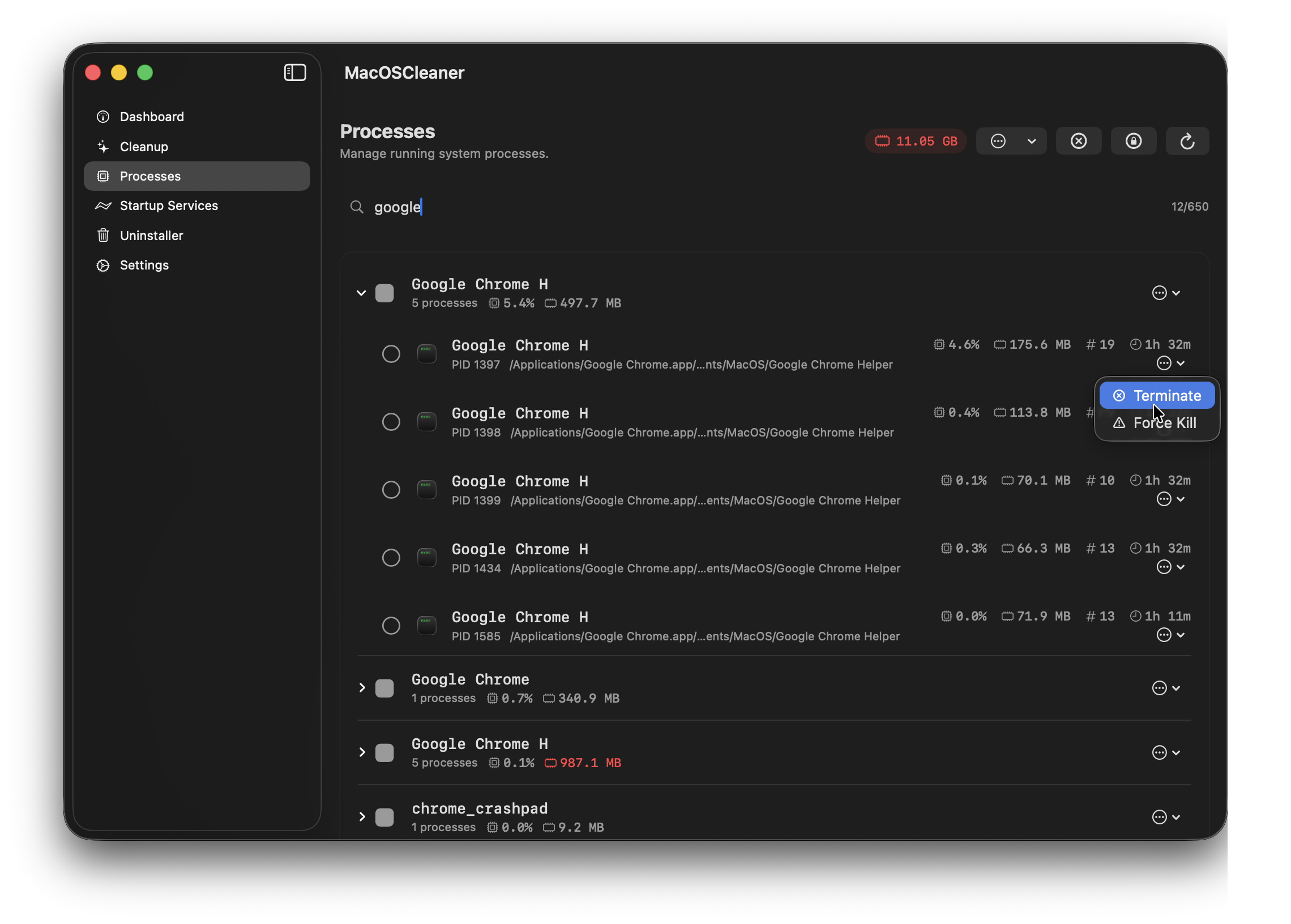
Process Manager ⚙️ — redesigned with modern macOS styling. Lists running processes, lets you terminate or force-kill them. Critical system processes (kernel_task, launchd, WindowServer) are protected.
Startup Services 🚀 — redesigned with modern macOS styling. Shows all LaunchAgents from ~/Library/LaunchAgents, their load status, and lets you enable/disable them.
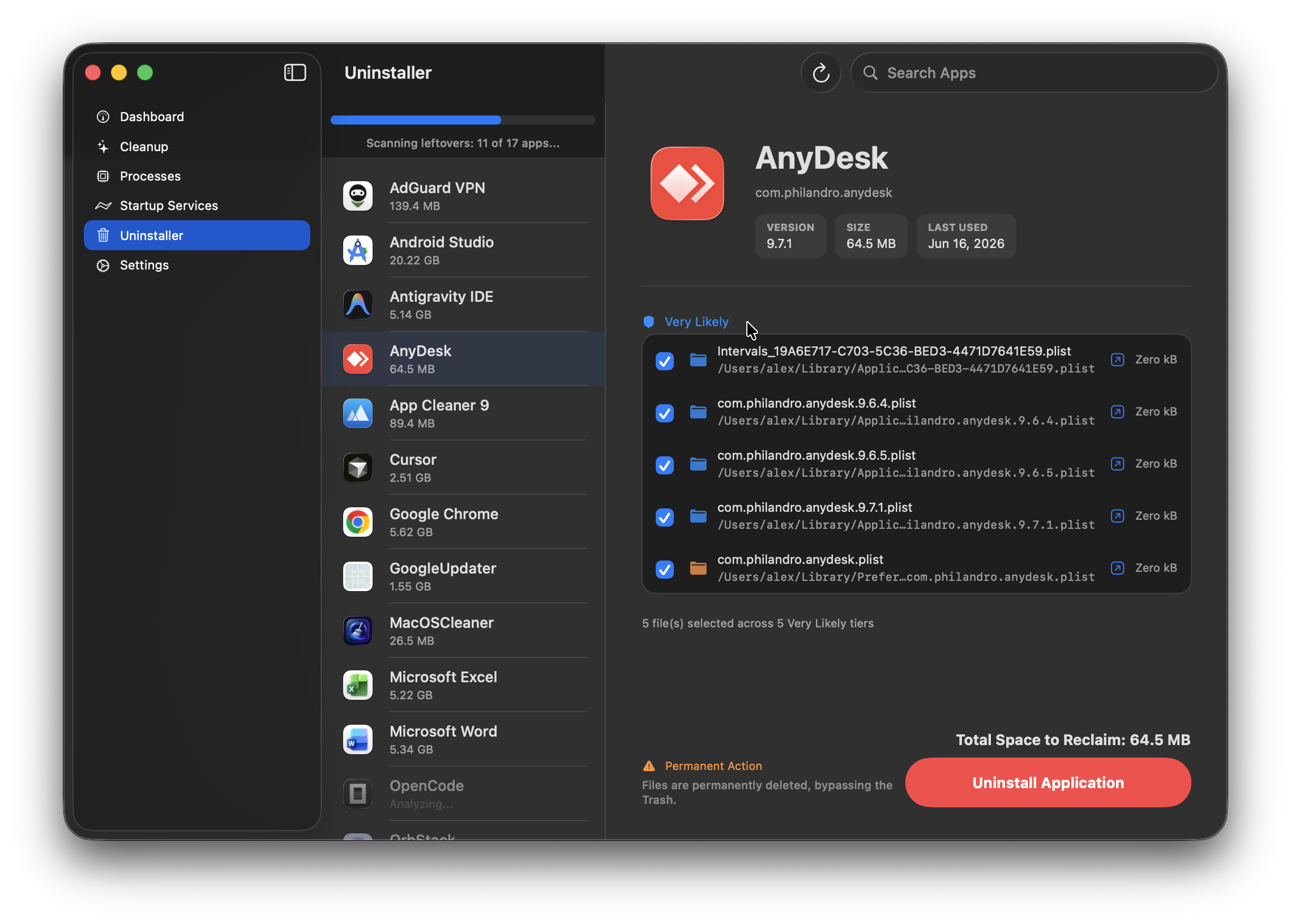
App Uninstaller 🗑️ — finds installed apps, scans 5 levels deep for residual files using 14 types of evidence (Bundle ID, Team ID, Spotlight, Plist contents, and more). Shows total reclaimable space and real-time scan progress. Tailored rules for over 95 popular apps including Docker, Parallels, Adobe CC, MS Office, Discord, Figma, and more.
- Background Deep Scanning — apps are scanned thoroughly in the background; the UI updates in real time as each app's total size is finalized
- Evidence-Based Forensics — each candidate file is scored against 14 evidence types: identity, code signing, system integration, metadata, content analysis, graph relationships, and Launch Services registration
- Confidence Tiers —
.guaranteed(critical evidence),.veryLikely,.possible, or.ignore - Developer Components — detects and offers to clean Android SDK, Gradle/Maven, Xcode DerivedData, iOS Simulators, Flutter pub-cache, Docker containers, and Homebrew artifacts
- Reveal in Finder — quick action to show any related file or folder in Finder before deleting
- Why this file? — each related file includes an evidence breakdown with localized explanations. Tap any file to see exactly why it was associated with the app
- Post-Uninstall Verification — re-scan confirms cleanup completeness; snapshots stored for rollback
Settings — rebuilt with native macOS Form styles to match System Settings. Light/dark/system theme, languages (English, Русский, Українська, Español), notifications, scan-on-startup, Trash behavior, and more.
- Full Disk Access (FDA): Fixed an issue where the FDA guidance window wouldn't appear on startup, and resolved false positives in permission checks by validating restricted directories
- OrbStack Safety: Accidentally deleting OrbStack paths from IDE caches — fixed. VM and Docker infrastructure are now protected
- Duplicate Files: Fixed inflated disk usage numbers in the duplicate files scanner
- Xcode Previews: Resolved a compilation issue preventing Xcode Canvas previews from rendering in Debug mode
Runs on Apple Silicon (M1–M5) with full parallelism — cleanup categories execute concurrently across all available cores. File scanning is done with a stack-based iterator that batches work and deduplicates inodes. Size calculations are cached to avoid redundant work. All cleanup paths are embedded as static Swift arrays — no runtime JSON parsing.
- Everything goes to Trash via
trashItem(at:)— always recoverable SafetyManagerblocks access to/System,/usr,/bin,~/.ssh, and other critical pathsProcessSafetyPolicyprotects system-critical processes from termination- Permanent deletion is opt-in and clearly marked in the UI
- Apps are closed before cleanup (graceful terminate → force-kill after 3s)
- Full Disk Access is requested at startup
- Swift 6 — actors,
async/await, structured task groups - SwiftUI —
@Observable,NavigationSplitView, Charts - Build — XcodeGen, whole-module optimization,
-OSwift flag - Logging — OSLog with structured subsystems
- Architecture — feature-oriented folders, component-based cleanup
MacOSCleaner/
├ App/                    # Entry point, RootView, sidebar navigation
├ Domains/
│  ├ Cleanup/             # Coordinator, Engine, StateMachine, ItemManager, Notifier, Models, EmbeddedCleanupPaths
│  ├ ProcessManagement/   # ProcessManager, ProcessSafetyPolicy
│  └ StartupServices/     # LaunchServiceManager
├ Features/
│  ├ Dashboard/           # DashboardView + ViewModel
│  ├ Cleanup/             # CleanupView + ViewModel, AnimatedScanView
│  ├ Processes/           # ProcessesView + ViewModel, ProcessRow
│  ├ Settings/            # SettingsView, AppSettings, StartupVendorSettings
│  ├ Uninstaller/         # 30 application rules, forensics engine, caches, UI
│  ├ StartupServices/     # StartupServicesView + ViewModel
│  ├ Permissions/         # PermissionsView
│  └ About/               # AboutView
├ Infrastructure/         # CommandRunner, SafetyManager, TrashManager, LanguageManager, PosixScanner, actors
├ Models/                 # CleanupItem, OperationRisk, RunningProcess, StartupService, etc.
└ Resources/              # Localizable.strings (en/ru/uk/es), assets
Requirements: macOS 15.5+, Xcode 16+, XcodeGen
cd MacOSCleaner
xcodegen
open MacOSCleaner.xcodeproj
# Cmd+R to run, Cmd+U to run testscd MacOSCleaner
xcodegen
open MacOSCleaner.xcodeprojIn Xcode: Product → Archive → Distribute App → Copy App → choose destination.
cd MacOSCleaner
xcodegen

xcodebuild -project MacOSCleaner.xcodeproj \
  -scheme MacOSCleaner \
  -configuration Release \
  -derivedDataPath build \
  -archivePath build/MacOSCleaner.xcarchive \
  archive

xcodebuild -exportArchive \
  -archivePath build/MacOSCleaner.xcarchive \
  -exportPath build/Export \
  -exportOptionsPlist ExportOptions.plist
Create ExportOptions.plist:
<?xml version="1.0" encoding="UTF-8"?>
<!DOCTYPE plist PUBLIC "-//Apple//DTD PLIST 1.0//EN" "http://www.apple.com/DTDs/PropertyList-1.0.dtd">
<plist version="1.0">
<dict>
    <key>method</key>
    <string>mac-application</string>
    <key>destination</key>
    <string>export</string>
    <key>signingStyle</key>
    <string>automatic</string>
</dict>
</plist>cd MacOSCleaner
xcodebuild -project MacOSCleaner.xcodeproj \
-scheme MacOSCleaner \
-configuration Debug \
-derivedDataPath buildAd-hoc (local testing only):
codesign --force --deep --sign - "/path/to/MacOSCleaner.app"Gatekeeper will block this on other Macs unless they right-click → Open.
Developer ID (recommended for sharing):
codesign --force --deep --options runtime \
  --sign "Developer ID Application: Your Name (TEAM_ID)" \
  "/path/to/MacOSCleaner.app"

xcrun notarytool submit "/path/to/MacOSCleaner.app" \
  --apple-id "your@email.com" \
  --team-id "TEAM_ID" \
  --password "app-specific-password" \
  --wait

xcrun stapler staple "/path/to/MacOSCleaner.app"
Verify:
codesign --verify --deep --strict --verbose=2 "/path/to/MacOSCleaner.app"
spctl --assess --type execute --verbose "/path/to/MacOSCleaner.app"
Fix damaged app attributes:
sudo xattr -r -c /path/to/MacOSCleaner.appLogs: open Console.app → filter by subsystem com.alextkdev.macos-cleaner.
Found a bug or have an idea? Open an issue — contributions are welcome.
Custom Non-Commercial License — free to use, study, and fork for personal or educational purposes. Commercial use and redistribution are not permitted. See LICENSE for details.
