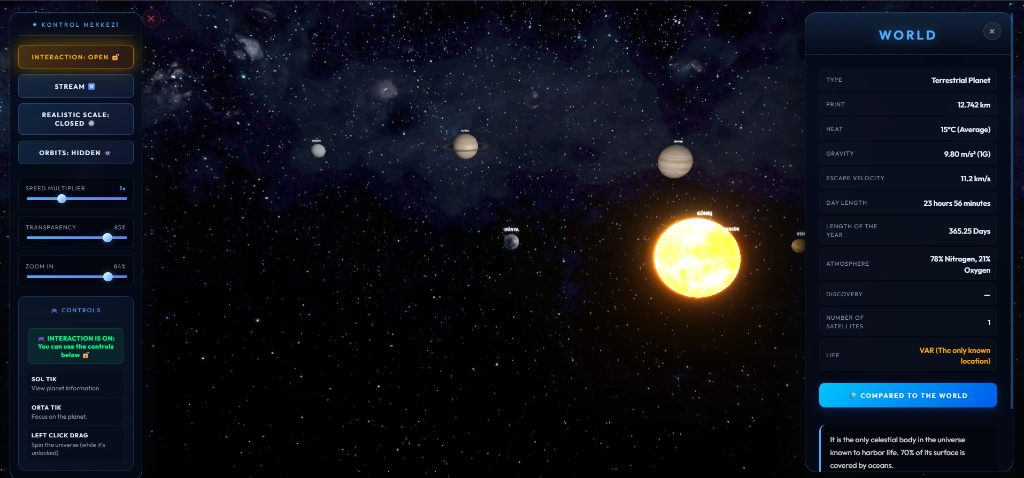
An interactive, ultra-realistic 3D Solar System simulation built with modern web and 3D graphics technologies (Three.js & WebGL). It delivers a breathtaking visual panorama alongside comprehensive educational and encyclopedic planetary data, custom GLSL atmospheric shaders, dynamic orbital physics, cinematic post-processing bloom, and out-of-the-box dual-language (English 🇬🇧 / Turkish 🇹🇷) support.
Additionally, with native Lively Wallpaper integration, you can run this live simulation interactively directly as your 3D Windows desktop background.
👉 🚀 Launch Live Web Simulation
- 💿 SolarSystemSimulation3D Setup 1.0.0.exe – Automated Windows Desktop Installer
- 💼 SolarSystemSimulation3D-Portable.zip – Standalone Portable Windows App (No Setup Required)
- 🌐 SolarSystemSimulation3D-Web.zip – Offline Web Package & Lively Wallpaper Distribution
This project features native support for Lively Wallpaper, enabling it to operate as a dynamic, interactive 3D desktop wallpaper without disrupting your daily workflow.
- Download and extract
SolarSystemSimulation3D-Web.zip(or clone the repository). - Open Lively Wallpaper on your Windows PC.
- Drag and drop the
index.htmlfile (or extracted folder) directly into your Lively library window.
Right-click your active wallpaper in Lively and select Customize to dynamically configure the following live parameters:
- Language (Dil): Toggle seamlessly between English and Turkish.
- Desktop Interaction: Lock or unlock background mouse camera navigation (rotate/zoom).
- UI Visibility: Show or hide the floating control panel for a pure cinematic panorama.
- Time Controls: Freeze orbital movement or resume in real-time.
- Simulation Speed: Scale simulation temporal speed from 0x to 3x.
- Realistic Scaling: Switch planet dimensions and orbital radii between aesthetic and scientific proportions.
- Orbital Lines: Toggle planetary orbit path lines.
- Panel Opacity: Adjust control panel glassmorphism transparency.
- Advanced Three.js & WebGL Engine: High-framerate 3D rendering pipeline with procedural particle stars and custom galaxy skybox textures.
- Dual-Language Support (i18n): Real-time, instant UI language switching between English 🇬🇧 and Turkish 🇹🇷 across all control sliders, tooltips, and encyclopedic data sheets.
- Custom GLSL Shaders:
- 🌞 The Sun: Dynamic surface noise textures with dynamic corona atmospheric light scattering.
- 🌍 Atmospheres: Custom limb-scattering shaders for Earth, Venus, and gas giant atmospheres.
- Cinematic Post-Processing:
UnrealBloomPassbloom rendering for realistic solar glare and lens flare effects. - Encyclopedic Planetary Cards: Click on any celestial body (Sun, Mercury, Venus, Earth, Moon, Mars, Ceres, Jupiter, Saturn, Uranus, Neptune, Pluto, Eris) to inspect physical data tables (diameter, surface temp, gravity, escape velocity, atmospheric composition) and generate an interactive wireframe Earth size comparison hologram.
- Instant UI Navigation: Click anywhere in empty space to dismiss active info cards or control panels cleanly.
| Action | Input / Control | Description |
|---|---|---|
| Language Switch | Control Panel Language Button | Toggle between English 🇬🇧 and Turkish 🇹🇷 |
| Interaction Lock | Control Panel Lock Button | Toggle mouse camera rotation lock on/off |
| Rotate Camera | Left Click + Drag | Orbit camera around selected focus point (when unlocked) |
| Zoom | Control Panel Zoom Slider / Mouse Wheel | Smoothly adjust camera focal distance |
| Inspect Celestial Body | Left Click on Planet | Open detailed encyclopedic information card & comparison |
| Focus Camera | Middle Click on Planet | Instantly move camera pivot to targeted planet |
| Close Panels | Left Click on Empty Space | Dismiss all active UI windows and cards |
If you wish to build or modify the project locally from source:
git clone https://github.com/MaximusPrime77/SolarSystemSimulation3D.git
cd SolarSystemSimulation3D
npm install- Development Server: Run local dev server with hot reload:
npm start # or npx vite - Build Web Distribution (
dist/): Compile production web assets:npm run build
- Build Desktop Setup Installer (
.exe): Compile Windows installer package:npm run setup
- Build Portable Desktop App: Package standalone desktop executable:
npm run dist


MaximusPrime77
- GitHub: @MaximusPrime77
License: MIT