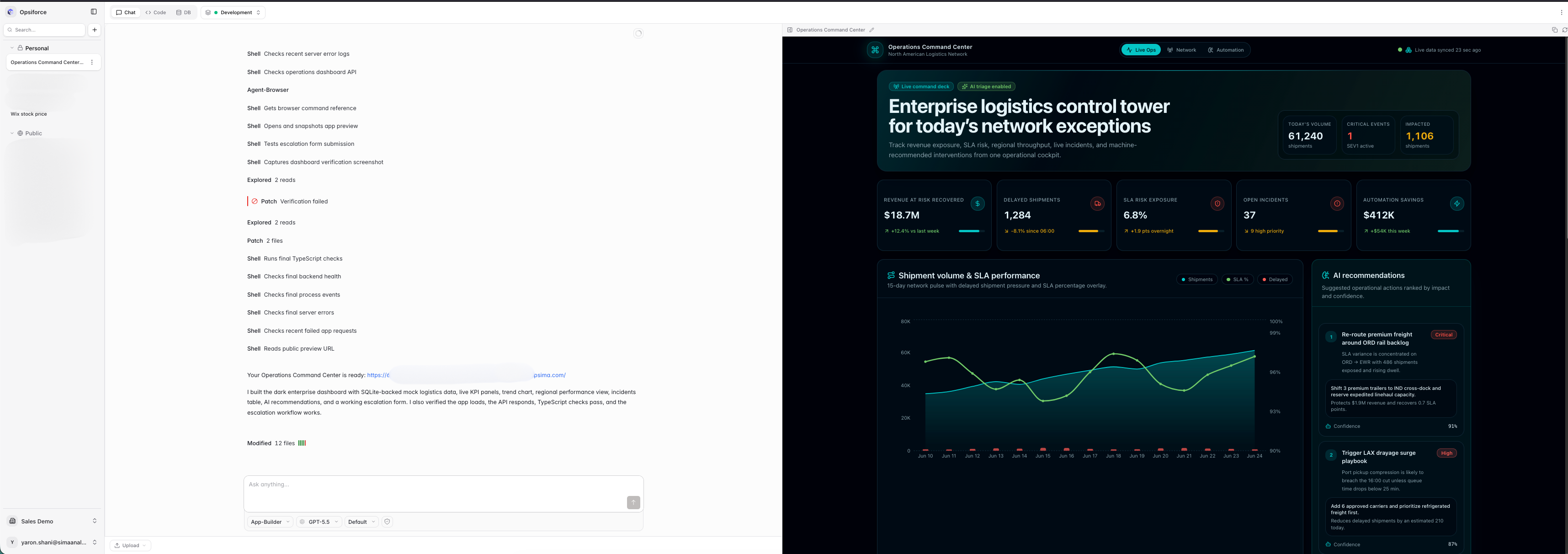
Opsiforce is a self-hosted, multi-tenant web platform for building and running AI-generated apps inside your own infrastructure. You deploy it once to a Kubernetes cluster and your team uses it from the browser. It is a service you host and operate, not a desktop app that runs on each person's machine. Each user can create multiple projects, and every project is its own chat with an AI agent backed by an isolated Linux/Kubernetes workspace where the agent can write real code, run commands, install packages, edit files, inspect data, and serve the resulting app through the platform.
It is meant to be an open alternative to products like Lovable, Base44, and AI coworker-style app builders, but with two different assumptions. First, building the app is only half the job. The platform should also host and run it, with a persistent runtime, live HTTPS URLs, and multiple environments, instead of generating code you then have to deploy and operate yourself. Second, the generated app should not be locked to one frontend framework, one backend runtime, or one database. Each app runs in a generic container with a persistent filesystem, project-level credentials, environment-specific configuration, and HTTPS routes managed by the platform.
Community: Join the Opsiforce Discord
Run it locally for development | Running in production
Most AI tools stop short in one way or another. Local coding assistants generate a real app but never host it, and the agent's context and session live only on that one machine, so they are lost on the next restart and shared with no one. Hosted builders do host the app and keep its history, but they lock it to a narrow stack on their cloud that you cannot run yourself. That is fine for a quick CRUD screen, but not if you want the platform to build and host the app for you in your own infrastructure, keep the agent's session alive and shared across a team, embed AI app building into a product, connect it to internal systems, or let users build more than a React + Supabase app.
Opsiforce is designed for teams that want:
- An AI app builder that also hosts and runs the apps it generates (persistent workspaces, live HTTPS URLs, and Development/Production environments), not just code you have to deploy yourself.
- A white-label experience that can be embedded into an existing product.
- Real code generation rather than low-code graph execution.
- Persistent state across pod restarts: not only files, databases, and IDE state, but the agent's own context and session, so a project resumes exactly where it left off.
- A generic runtime that can support different frameworks, languages, tools, and databases.
- Multiple environments, such as Development, Production, and custom environments.
- Reverse-proxied HTTPS routes for every app, preview, code editor, and database viewer surface.
- Organization-level SSO, RBAC, settings, budgets, resources, and operational visibility.
Opsiforce is not limited to one application template. The app runs inside a normal containerized workspace, so the agent can build whatever the configured toolchain supports.
Typical uses include:
- Internal dashboards, charts, reports, and admin screens.
- Forms and workflow tools for operations teams.
- Customer-specific portals embedded into an existing product.
- Data analysis apps that process uploaded files or connect to services.
- Middleware and integration apps that call APIs, send email, or run scheduled jobs.
- Full-stack apps in Node.js, Python, or other stacks available in the agent image.
- Apps that use SQLite in the persisted workspace, external databases, or any database reachable from the runtime.
The important distinction is that Opsiforce provides the workspace, hosting, proxying, persistence, identity, and agent control plane. The app itself is just code running in the project environment.
| Capability | What Opsiforce Provides |
|---|---|
| AI coding workspace | A chat-driven agent powered by OpenCode, embedded into the Opsiforce frontend rather than iframed as a separate product. |
| Isolated runtime | Every running project environment gets its own Kubernetes pod with an app server, OpenCode agent, VS Code web IDE, database viewer, and persistent workspace volume. |
| Persistent filesystem | Source code, git history, OpenCode session data, app SQLite databases, generated files, IDE settings, and uploaded files survive pod replacement. |
| Generic app container | The runtime is not tied to React, Supabase, or a fixed backend. Apps can use the packages, tools, databases, and services available to the container and network. |
| Built-in hosting | Apps are served from the same pod and exposed through runtime proxies with project/environment-specific hostnames. |
| Reverse proxy and SSL | App, preview, code, database, and platform routes are designed to sit behind the platform edge proxy with HTTPS for every project/app surface. |
| Multiple environments | Every project starts in Development and can publish into Production or custom environments. Each environment has its own pod, files, URLs, auth mode, schedules, and environment variables. |
| Incremental publishing | Publishing uses git to move tracked source from Development into another environment, preserving runtime state such as production databases and environment-specific config. |
| App auth | Each environment can be public, manually protected by the owner's OIDC provider, or protected by a managed provider configured by the platform operator. |
| LLM gateway | Bifrost gives each project virtual LLM keys, usage tracking, and budget enforcement without exposing real provider keys to pods. |
| Service gateway | Agent-built apps can call centrally managed services, such as email, through per-project gateway tokens instead of raw provider credentials. |
| Schedules | Agents can register per-environment recurring jobs that wake suspended apps, call internal endpoints, and record execution results. |
| Admin and settings | Organizations get permission-gated settings for users, workspaces, environments, integrations, defaults, billing, and operational pod visibility. |
Opsiforce is a Kubernetes-native control plane plus a set of runtime proxies.
 The backend is the control plane. It creates and wakes pods, manages projects and environments, writes settings, enforces permissions, talks to Kubernetes, and manages gateway credentials. It does not stream app traffic. The Go runtime proxies carry traffic to the right pod after checking with the backend that the environment is ready.
Each project environment is disposable at the pod layer and durable at the workspace layer. If a pod is suspended, evicted, restarted, or recreated, the same persistent workspace is mounted back into the next pod.
The point is not that the alternatives are bad. Each category is strong for its intended job. Opsiforce combines parts of several categories for teams that want AI-generated apps, real hosting, persistence, and product integration in one self-hostable system.
| Alternative | Good At | Common Limits | Opsiforce Difference |
|---|---|---|---|
| Lovable / Base44-style app builders | Fast app generation from chat, instant previews, simple CRUD apps. | Usually opinionated around a narrow stack, hard to white-label, limited backend/runtime control, often dependent on external services for missing primitives. | Provides the chat-to-app experience, but runs apps in generic persistent containers that can be hosted, branded, and embedded inside your product. |
| n8n / Zapier-style automation | Visual workflows, integrations, hosted automation, simple business processes. | Complex logic becomes awkward, arbitrary packages and command execution are limited, and end-user UX can become workflow-builder-centric. | Uses real code in a full workspace, so complex app logic, custom packages, dashboards, forms, and long-lived app state are natural. |
| Agent builders from model providers | Strong reasoning, managed model access, broad open-ended tasks. | They are usually not deterministic app platforms, do not provide a full app hosting lifecycle, and do not give product-ready environment management. | Wraps the agent in a product platform: projects, pods, environments, hosting, credentials, budgets, permissions, and admin surfaces. |
| Raw Kubernetes / Cloud Run / AWS | Maximum flexibility, any language, any database, production-grade infrastructure. | Requires architecture, DevOps, deployment pipelines, identity wiring, cost controls, and a user-facing AI builder on top. | Keeps the flexibility of containers and Kubernetes while adding the AI builder, runtime proxies, persistence model, and product control plane. |
| Claude Code / local AI coding assistants | Excellent at writing code, using a terminal, and working inside a filesystem. | No built-in multi-user hosting, environment publishing, SSL routing, service gateways, persistent cloud workspaces, or admin controls. | Gives each project a cloud-hosted coding workspace with persistent storage, live app URLs, VS Code, DB viewer, gateways, and Organization controls. |
Opsiforce can be used as a standalone internal platform, but it is also designed to be integrated into another product.
Integration-oriented features include:
- White-label frontend and product surface.
- SSO/OIDC-based authentication through the platform edge.
- Permission strings that flow from identity provider groups into backend enforcement and frontend gating.
- Per-organization workspaces, users, environments, integrations, defaults, and billing settings.
- App catalog pinning for surfacing generated apps to the wider organization.
- Environment-level app auth for public apps, managed auth, or app-owned OIDC.
- Service gateway patterns for connecting generated apps to product-provided services without leaking credentials.
This makes Opsiforce useful as infrastructure for products that want to let customers or internal users create their own dashboards, reports, operational screens, forms, and tools without leaving the product boundary.
Opsiforce separates a Project from the environments that actually run it.
- A Project is the durable shell: ownership, workspace, agent, budgets, resources, and cross-environment policy.
- A ProjectEnvironment is the running thing: pod, workspace directory, public URLs, auth mode, schedules, environment variables, and app state.
Every project has a Development environment. It can publish into Production or custom environments such as Staging. Publishing copies tracked source from Development into the target while preserving target-specific state like databases and environment variables.
This is what lets a user iterate with the agent in Development, review the result, and then publish into a stable environment without treating every AI-generated change as immediately live.
Opsiforce treats pods as replaceable and workspaces as durable.
The persistent workspace stores:
- App source and git history.
- OpenCode session database and chat history.
- App SQLite databases and generated output.
- Uploaded files.
- Agent config and skills copied into the workspace.
- VS Code settings and extensions.
The pod can be suspended when idle and recreated later against the same workspace. This is different from a stateless preview container: the app, code, conversation, generated files, and local databases continue to exist across runtime churn.
Start with these docs when working on the system:
- Overview for the architecture and package map.
- Documentation index for the complete doc tree.
- Domain vocabulary for canonical product language.
- Project Environments for Development, Production, publishing, auth, and environment variables.
- Persistence for workspace durability and pod replacement.
- Request Flows for how browser traffic reaches each pod surface.
- LLM Gateway and Service Gateway for credential isolation.
Opsiforce is licensed under the GNU Affero General Public License v3.0.
Opsiforce is a Kubernetes-native platform, and local development mirrors that: the backend, the runtime proxies, the LLM gateway, and the per-project agent pods all run inside a local Kubernetes cluster (minikube), while the frontend is served on the host through Vite. Browser entrypoints are exposed under *.opsiforce.localtest.me (localtest.me resolves to 127.0.0.1, so there are no host-file edits).
One command stands the whole thing up:
yarn && yarn devThis is the Quickstart: yarn installs the workspace dependencies, then yarn dev runs the orchestrator. It works on macOS and Linux. From a fresh clone it sizes and starts the cluster, generates a locally trusted TLS certificate, brings up PostgreSQL, Redis, ingress, and the LLM gateway, builds the images, migrates the databases, connects an LLM, and opens the app, already signed in as a local dev user with full access, no identity provider to configure. It is idempotent and resumable: run it again to bring the stack back up, a failed step is resumed on the next run, and yarn dev --reset tears everything down for a clean start.
On macOS there is nothing to install up front: the Quickstart detects missing tools and, with your consent, installs them via Homebrew (a container runtime, minikube, kubectl, Helm, Tilt, mkcert, Node, and Yarn).
On Linux you install the prerequisites yourself, then run yarn && yarn dev. On Ubuntu:
# Docker Engine (official script, includes Buildx and Compose)
curl -fsSL https://get.docker.com | sh
sudo usermod -aG docker "$USER"          # log out/in so the group applies

# kubectl, Helm, Go
sudo snap install kubectl --classic
sudo snap install helm --classic
sudo snap install go --classic

# Node 24 + Corepack (provides Yarn)
curl -fsSL https://deb.nodesource.com/setup_24.x | sudo -E bash -
sudo apt-get install -y nodejs
sudo corepack enable

# minikube
curl -fsSLo minikube "https://storage.googleapis.com/minikube/releases/latest/minikube-linux-$(dpkg --print-architecture)"
sudo install minikube /usr/local/bin/ && rm minikube

# Tilt
curl -fsSL https://raw.githubusercontent.com/tilt-dev/tilt/master/scripts/install.sh | sudo bash

# mkcert + NSS tools (locally trusted TLS for the browser)
sudo apt-get update && sudo apt-get install -y mkcert libnss3-tools
On Linux the cluster uses the Docker driver and minikube tunnel binds 127.0.0.1:80 and :443 for ingress, so the Quickstart asks for sudo once to bind those privileged ports.
For the LLM, the default local proxy lets you drive a ChatGPT/Codex subscription you already pay for (a one-time browser sign-in, no API credits) or your own OpenAI API key. You are not limited to those: the LLM gateway is Bifrost and the agent runtime is OpenCode, so you can use any provider they support (Anthropic, Google, Azure OpenAI, AWS Bedrock, OpenRouter, local or self-hosted models, and more) by configuring it in Bifrost and selecting the model in OpenCode. For the full walkthrough (every numbered step, the LLM choices, the pinned-versions manifest, and day-two re-runs), see the Quickstart guide.
yarn dev runs every long-running process under one Tilt UI (per-service logs, status, and a restart button) at https://tilt.opsiforce.localtest.me. The addresses you'll use:
| Service | URL |
|---|---|
| Opsiforce app | https://opsiforce.localtest.me |
| Project app previews | https://{project}.apps.opsiforce.localtest.me |
| Project preview snapshots | https://{project}.preview.apps.opsiforce.localtest.me |
| VS Code | https://{project}.code.opsiforce.localtest.me |
| DB viewer | https://{project}.db.opsiforce.localtest.me |
| Bifrost dashboard | https://bifrost.opsiforce.localtest.me |
| Tilt UI | https://tilt.opsiforce.localtest.me |
| Backend (Tilt port-forward) | http://localhost:3010 |
| Frontend Vite server | http://localhost:8084 |
| Drizzle Studio | http://localhost:4983 |
| PostgreSQL (Tilt port-forward) | localhost:5435 |
| Redis (Tilt port-forward) | localhost:6382 |
The day-to-day commands you run while developing (type-check, lint, format, database, and the per-workspace tasks) are in the command reference: docs/development/commands.md.
The Quickstart targets local development. A production deployment uses the same components on infrastructure you operate:
- Kubernetes control plane: a managed or self-managed cluster (not minikube), sized for the control plane plus the per-project agent pods.
- Traefik ingress controller: the app, runtime-proxy, and per-project routes expect Traefik; install it in-cluster and point DNS at its load balancer.
- RWX persistent storage: project workspaces need ReadWriteMany volumes that survive pod replacement; back them with a shared-storage system such as Ceph (for example Rook-Ceph or CephFS) or another RWX-capable provisioner.
- Container registry: build and host the Opsiforce images (agent, backend, runtime-proxy, frontend) in your own registry instead of building into minikube.
- Helm values, adjusted for your environment: image references and tags, ingress hosts and TLS, storage classes, replica counts, resource requests and limits, PostgreSQL/Redis, and Bifrost provider secrets.