


This is an unofficial custom integration for Home Assistant that allows you to connect and control Liebherr smart devices via the Liebherr SmartHomeAPI using the simple pyliebherr library.
Important
There is a Liebherr core integration in Home Assistant as of 2026.3 authored by @mettolon. If you want a very stable and fully tested integration I suggest using the core integration!
- Uses Server-Sent Events to receive updates (Cloud Push)
- Monitor current and target temperatures of your Liebherr refrigerators and freezers.
- Control device features such as BioFreshPlus, Hydrobreeze, AutoDoor, Presentation Lights, and Ice Makers.

or search for the Liebherr integration in HACS
- Download the latest release from the GitHub Releases page.
- Extract the downloaded archive.
- Copy the
custom_components/liebherrfolder to your Home Assistantcustom_componentsdirectory.- Example:
/config/custom_components/liebherr
- Example:
- Restart Home Assistant.

- In Home Assistant, navigate to Settings > Devices & Services.
- Click Add Integration.
- Search for "Liebherr" and select it.
- Enter your Liebherr HomeAPI API key. (see Smart Device Home API to get a key)
- Complete the setup process.
- (Optional): Configure the polling interval and the entity type for Presentation Light (see below).
Once the integration is configured, your Liebherr devices will appear as entities in Home Assistant. You can:
- Monitor temperatures and other metrics.
- Control switches and settings via the Home Assistant UI or automatons.
Controls and features will map to the following domains:
| Liebherr Feature | Homeassistant Domain |
|---|---|
| Auto Door | Cover |
| Ice Maker, BioFreshPlus | Select |
| Presentation Light | Light or Number1 |
| SuperCool, SuperFreeze, PartyMode, NightMode | Switch |
| HydroBreeze | Fan |
| Temperature2 | Climate |
image_url (Device) |
Image |
| Bottle Timer | Not available |
| Energy Monitors | Not available |
| Holiday Mode | Not available |
| Door Alarm | Not available |
- In version ≥ 2025.12.5 the domain/type of control/entity created can be selected in the integration options.
- Some Liebherr models only allow temperature to be set to certain values (i.e. 1, 3, 5, or 7 ℃). The Liebherr API now sends an json attributes
setTemperatureStepsandsetTemperatureStepsEnabledbut the format ofsetTemperatureStepsis not documented by Liebherr. Awaiting a response in iluvdata/liebherr#42 to improve integration functionality.
Note
All features available in the Liebherr SmartDevice API have been implemented as of 29 Jun 2026. Just because the feature exists in the Liebherr SmartDevice App does not mean it's available in the API. Feature requests to implement app features not available in the API will be ignored.
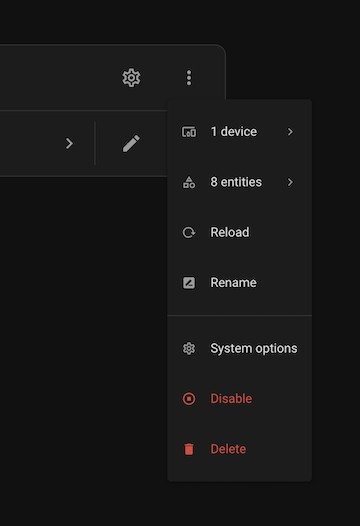
Currently appliances added to your Liebherr account will not be automatically discovered. Once an appliance is connected to your Liebherr account (and accessible in the SmartHome app) manually reload the integration from the integration screen:

and click on "Reload" on the configuration menu:
- Ensure your Liebherr api key is correct.
- Check the Home Assistant logs for any errors related to the integration.
- Enable debug on the integration.
- Download and inspect the integration diagnostics.
Warning
This was tested on a Liebherr Device lacking:
AutoDoor (reported to be working)
Presentation Light (reported to be working both as number and light entity)
BioFreshPlus (reported to be working)
HydroBreeze (reported to be working)
If you encounter an issue with these features please submit an issue.
This is a complete rewrite of the custom integration originally maintained by @bhuebschen from a fork created by @skatsavos. The original integration stopped working in Oct 2025 and the original maintainer did not appear to be maintaining the project.
If you encounter any issues or have feature requests, please open an issue on the GitHub Issues page.
Contributions are welcome! Feel free to submit pull requests to improve this integration.
This project is licensed under the MIT License. See the LICENSE file for details.