Pre-required: We have our .prefab object inherited from
MonoContainerso it can be picked up as a container
Addressables and UniTask required, so first-thing-first install a .unitypackage from UniTask releases.
- Create a factory, our base one or your custom one (you can inherit and override creation process for your needs):
_popupsFactory = new ResourceContainerFactory("Popups", _popupScreenRoot.transform);
- (optional step) Create a loader (u can override logic inside it not touching factory logic):
var _popupsLoader = new MonoContainerLoader(_popupsFactory);
- Get your container loaded:
var friendPopup = await _popupsFactory.CreateInstance<FriendInvitePopup>();
Loader variant:
var friendPopup = await popupsLoader.LoadContainer(new FriendData(_friend), "Rare Invite Variant");
If you have custom data to pass (for example coins count or username) you can create custom
FriendDataclass and inherit it fromContainerData.
You can also create custom loaders with your custom injected factory:
var decryptLoader = new MonoContainerLoader(new DecryptContainerFactory("Atlases", salt));
Factory that created containers owns the actual release (Destroy() for Resources, ReleaseInstance() for Addressables):
container.Unload();                     // ergonomic self-release (factory handles)
_popupsFactory.Release(container);      // equivalent, from the factory
_popupsFactory.ReleaseAll();            // release everything this factory spawned
Use AddressableContainerFactory in place of ResourceContainerFactory to load through Addressables instead of Resources. The load key is the resolved folder/name (or your customName), so set your Addressable addresses to match:
_popupsFactory = new AddressableontainerFactory("Popups", _popupScreenRoot.transform);
//u can use same _popupsFactory.Release(container); or container.Unload(); this way
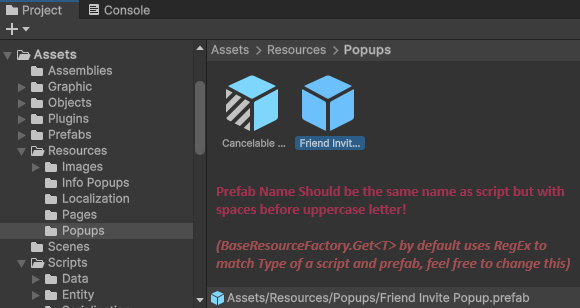
By default the prefab/address is derived from the container type name (FriendInvitePopup -> "Friend Invite Popup"). When the asset name doesnt match the type, pass customName — usually last optional argument on every create/load call, so the type name and its regex are ignored:
var container = await _popupsFactory.CreateInstance<FriendInvitePopup, InviteData>(data, "Special Invite Variant");
// or without data:
var container = await _popupsFactory.CreateInstance<FriendInvitePopup>("Invite Event [Rare]");