

Terminal dashboard for watching stocks: live quotes and charts next to AI-scored financial news, sentiment and SEC Form 4 insider activity. Built in Rust with ratatui.
-
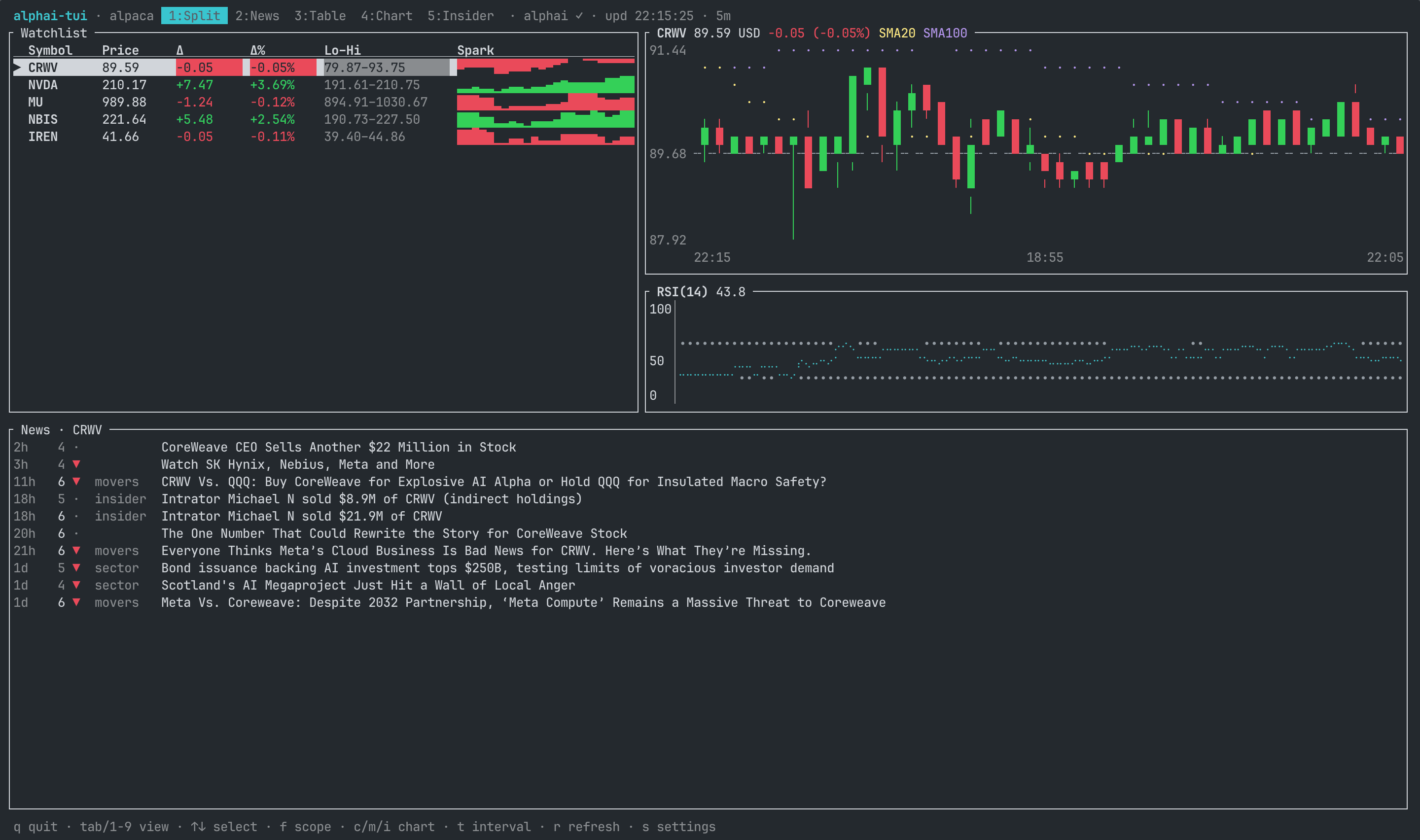
Split (the default view): watchlist and chart side by side in the top half, the news feed in the bottom half (hidden on very small terminals).
-
News: enriched articles for the selected ticker, the whole market or the 48-hour trending top 10 (
fcycles the three scopes), shown as a list next to a full article card with the complete AI analysis: price impact prediction with confidence, relevance and novelty scores, actionability, background context, key entities and a contrarian view. The feed shows articles with a relevance score of 7 and up by default;+and-move that bar live (1 to 10, filtered server-side, the block title shows the active value) and[ui] news_min_scoresets the startup default. Articles fresher than 15 minutes light up their age in the accent color.xflips the layout between side-by-side and list-over-card,vexpands the card to full screen, PgUp/PgDn scroll it. On terminals narrower than 90 columns the side layout gives the whole width to the list andvremains the way to read the card. Pressing down on the last row loads the next page of the feed; the page size adapts to your plan automatically (10 per page, 50 on Pro keys). Market and trending scopes collapse syndicated reprints to one row per story and show how many outlets carry it (×7). Enter opens the article page on alphai.io; a settings toggle switches that to the original source site. A 7-day bullish/bearish rollup tops the ticker scope.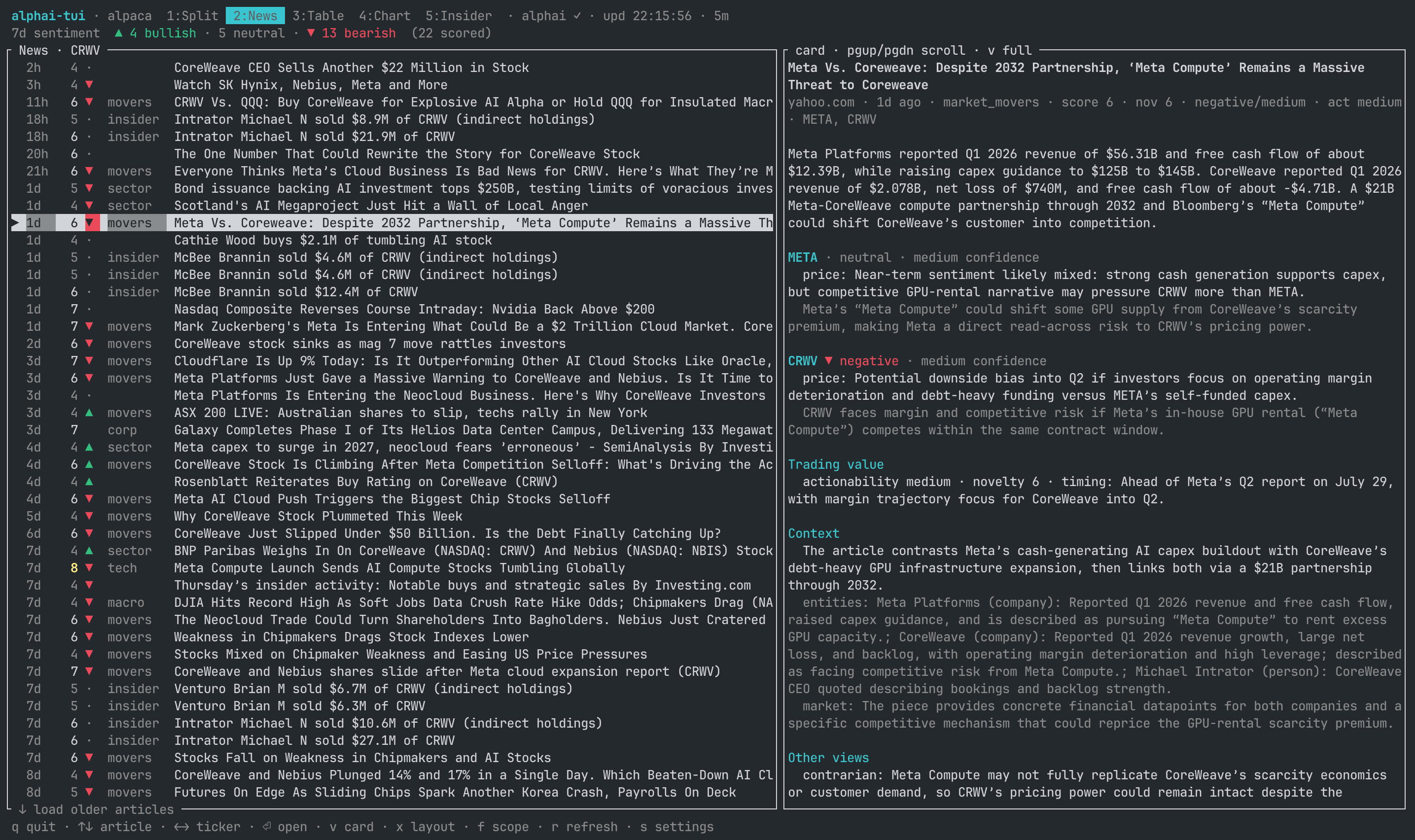
-
Table: watchlist with price, change, day range and unicode sparklines.
-
Chart: candlestick chart of the selected ticker at half-block resolution, with a previous-close reference line, SMA 20/100 overlays and an RSI(14) panel. The SMA overlays thread through the candles as thin braille lines.
cswitches to the classic Braille line chart,manditoggle the indicators,tcycles interval presets on the fly. The client quietly fetches extra history beyond the visible window, so the SMA and RSI lines are fully drawn from the first candle on screen instead of waiting a hundred candles to warm up. -
Insider: SEC Form 4 activity for the selected ticker. A 30-day rollup (buys vs sells, dollar volumes, share of pre-arranged 10b5-1 plan trades, most active insiders with their transaction counts) above the stream of filing events. Each filing row shows the trade side straight from the filing (a buy/sell glyph; a sale back to the issuer stays neutral instead of reading as a market sale), a
D/Imarker for direct or indirect ownership, apflag on pre-arranged 10b5-1 plan trades and the total trade value. The article card breaks the event down further: shares, the value-weighted average price, the SEC transaction code, who traded and their role, and the transaction date. Insider rows are scored from the trade size, so+and-filter the stream by dollar value ([ui] insider_min_scoresets the startup default; 7 keeps roughly the $10M+ trades). The stream pages like the news feed: down on the last row loads more.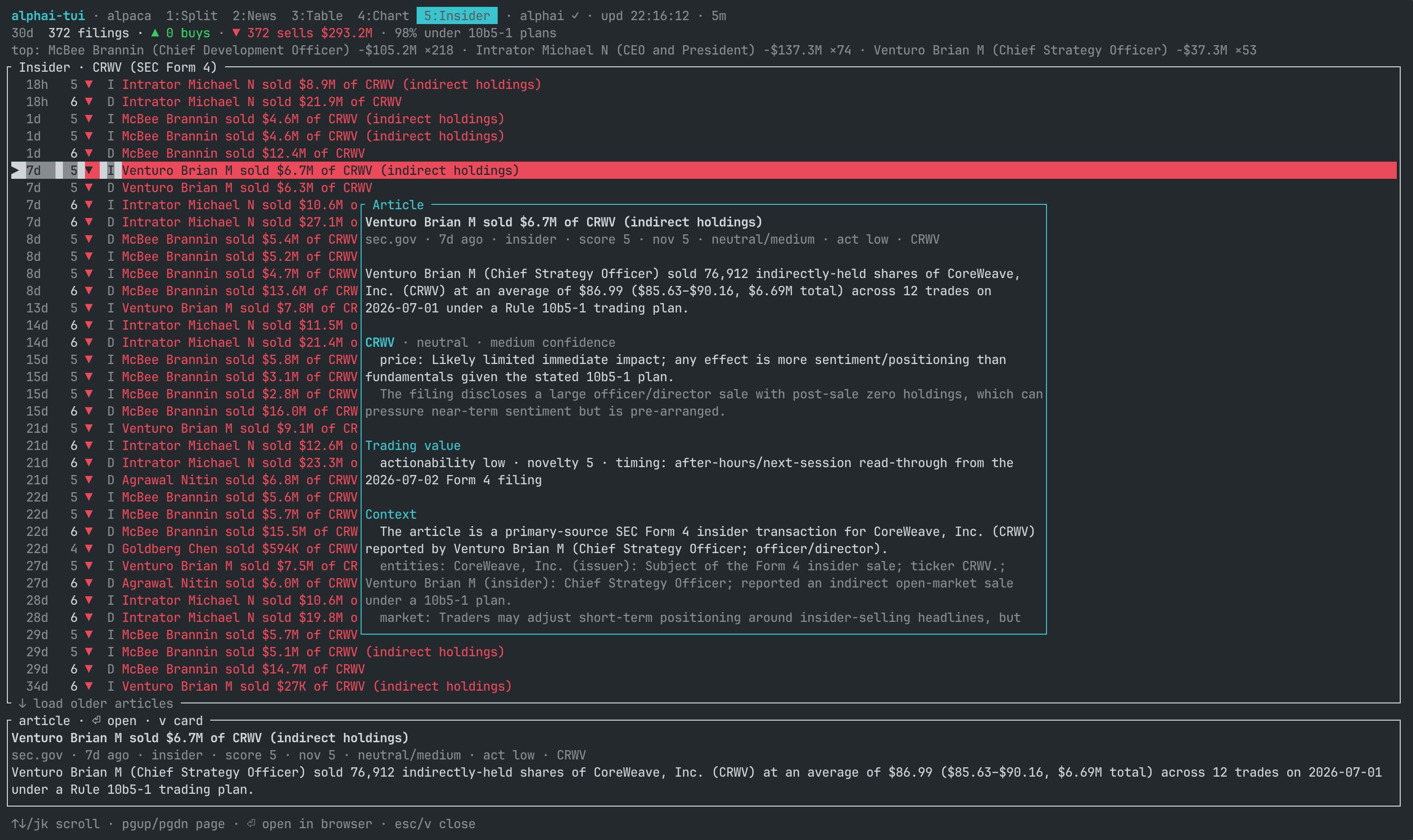
-
In-app settings (
s): pick the price source, paste API keys once and choose where Enter opens news articles. Everything is saved to a config file, so after the first run a barealphai-tuiis enough.
Prices work with no key at all (Yahoo). News, sentiment and insider views use the AlphaAI API and need a free key.
Homebrew (macOS and Linux):
brew install makeev/tap/alphai-tuiPrebuilt binaries for macOS, Linux and Windows, no Rust needed:
curl -LsSf https://github.com/makeev/alphai-tui/releases/latest/download/alphai-tui-installer.sh | sh# Windows
powershell -ExecutionPolicy Bypass -c "irm https://github.com/makeev/alphai-tui/releases/latest/download/alphai-tui-installer.ps1 | iex"Archives for every platform, with checksums, live on the releases page.
With a Rust toolchain (1.85+):
cargo install alphai-tuiOr straight from the repository:
cargo install --git https://github.com/makeev/alphai-tuiOr from a clone:
git clone https://github.com/makeev/alphai-tui
cd alphai-tui
cargo run --release -- AAPL MSFT NVDA BTC-USDalphai-tui AAPL MSFT NVDA BTC-USDThe first run opens the settings screen: pick a price source and paste your
AlphaAI key (get one free at alphai.io, Account >
API keys). Leave it empty if you only want quotes and charts. Your watchlist
and options persist in the config file, so next time plain alphai-tui works.
alphai-tui --once AAPL      # print quotes to stdout and exit (for scripts)
alphai-tui -s finnhub NVDA # explicit source for one run| Flag | Default | Meaning |
|---|---|---|
-s, --source |
yahoo |
Price source: yahoo, finnhub or alpaca |
-e, --every |
15 |
Poll interval, seconds |
-r, --range |
1d |
History window: 1d 5d 1mo 3mo 6mo 1y 2y |
-i, --interval |
5m |
Candle size: 1m 2m 5m 15m 30m 60m 1d |
--once |
Print quotes to stdout and exit | |
--config |
Use an alternate config file (Save writes back to it) |
-r and -i set the startup window; the t key cycles the preset
combinations (configurable as [chart] presets) for the session without
persisting them.
CLI arguments win over the config file; the config file wins over built-in
defaults. API keys can also come from env vars, which win over the config:
ALPHAI_API_KEY, FINNHUB_API_KEY, APCA_API_KEY_ID, APCA_API_SECRET_KEY.
| Key | Where | Action |
|---|---|---|
Tab / 1..5 |
everywhere | switch view |
↑ ↓ / j k |
table, chart, split | select ticker |
↑ ↓ / j k |
news, insider | scroll articles |
← → / h l |
news, insider | switch ticker |
Enter / o |
news, insider | open article in browser |
v |
news, insider | fullscreen article card; scroll with ↑ ↓, Esc closes |
x |
news | flip the list/card layout: side-by-side or stacked |
PgUp PgDn |
news | scroll the article card pane |
↓ / j on the last row |
news, insider | load the next page of the feed |
f |
news, split | cycle news scope: selected ticker, whole market, trending |
+ / - |
news, insider, split | raise / lower the visible feed's score filter (news: relevance, starts at 7; insider: trade size, starts at 4) |
c |
chart, split | toggle candlestick / line chart |
m |
chart, split | toggle SMA 20 and SMA 100 overlays |
i |
chart, split | toggle the RSI(14) panel |
t / T |
everywhere | cycle candle interval presets forward / back (each interval with a matching history window; the list is configurable as [chart] presets) |
r |
everywhere | refresh prices and the visible news view |
s |
everywhere | settings |
q / Esc / Ctrl-C |
everywhere | quit |
alphai-tui is a single self-contained process, so a terminal multiplexer
(tmux, zellij, screen, or your terminal's own splits) turns it into a
custom trading workspace: run one instance per pane and switch each pane
to the view you want with 1..5.
tmux new-session -d -s market 'alphai-tui CRWV'
tmux split-window  -h 'alphai-tui AAPL'      # news pane on the right
tmux split-window -v -t market:0.0 'alphai-tui NVDA'
tmux split-window -v -t market:0.1 'alphai-tui NBIS'
tmux attach -t market
Press 4 in the chart panes and 2 in the news pane, and you get a wall
of charts next to a live scored feed:
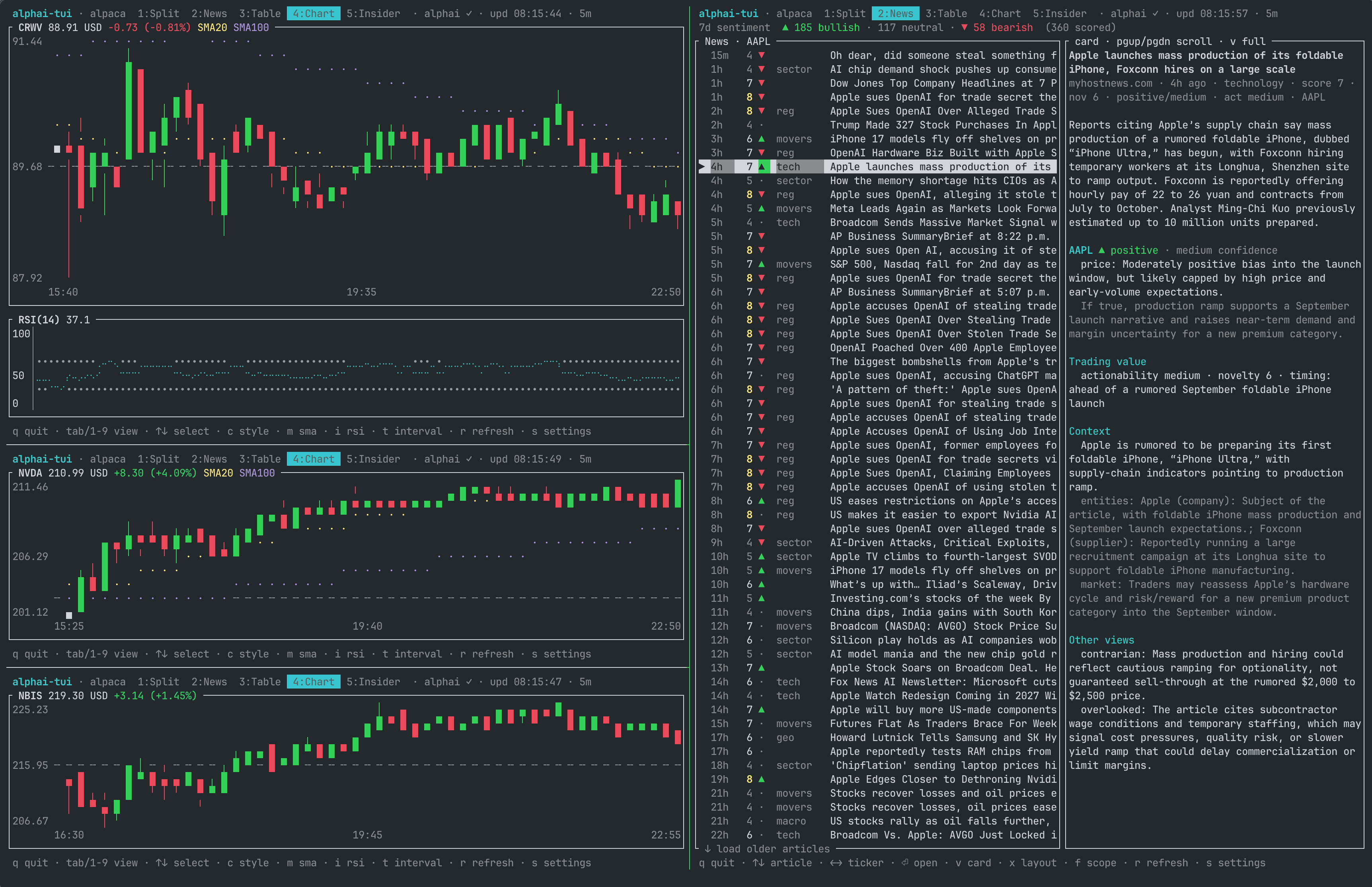
Two things the instances share. The config file is one: the last pane to save settings wins, so set things up once and let the other panes just read it. Your AlphaAI key's rate budget is the other: every pane showing news or insider data spends requests from the same per-key allowance, so on a free key keep an eye on how many such panes you open.
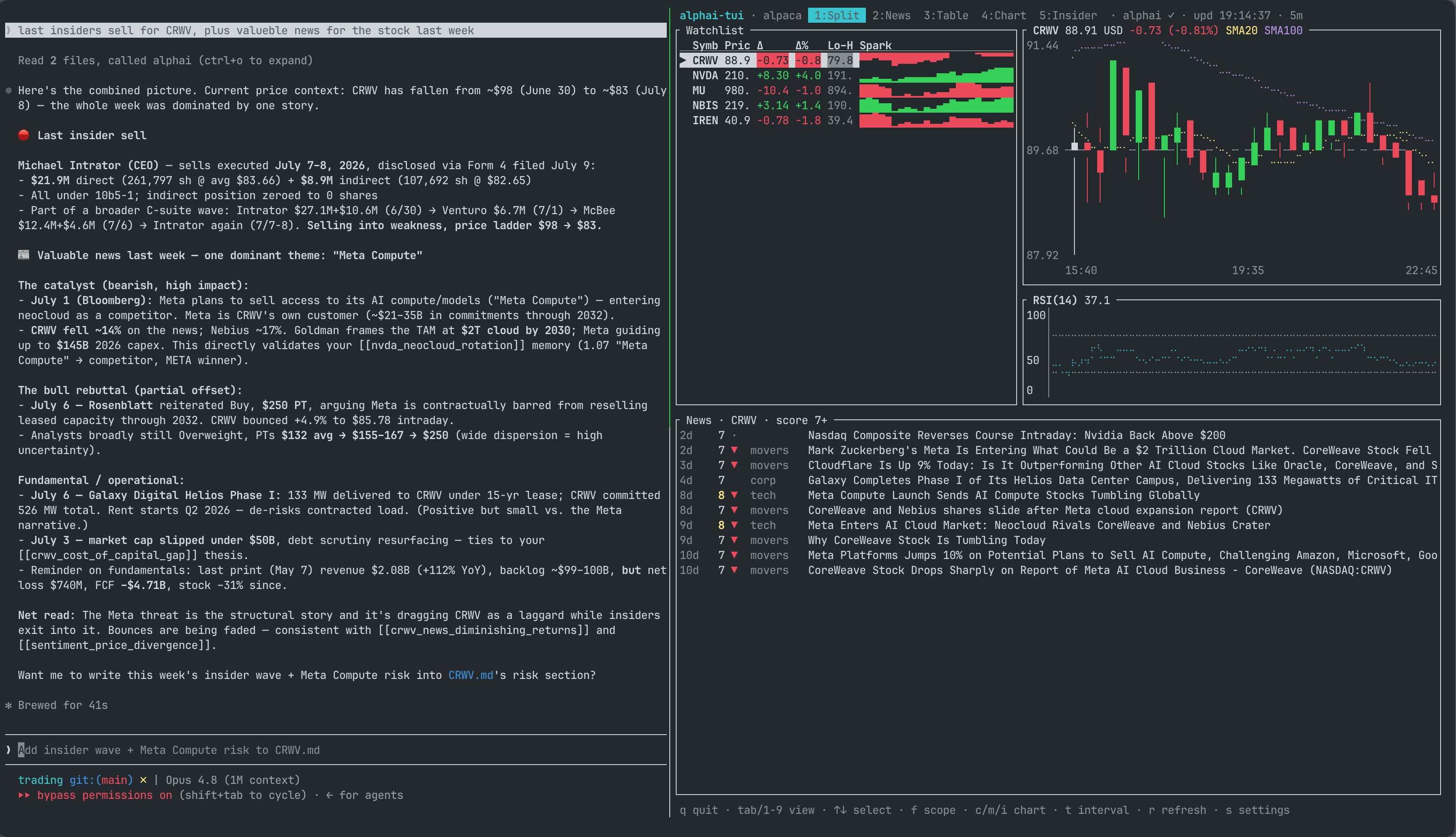
The same trick turns the terminal into a full trading desk with an AI analyst on staff. Run an agent such as Claude Code in the pane next to alphai-tui and connect it to the AlphaAI MCP server, which serves the same news, sentiment and insider data as the dashboard. You watch the tape on one side while the agent digs through whatever the tape surfaces: ask it for the last insider sells and the news that moved the stock this week, and get a sourced brief without leaving the terminal.
Prices
-
yahoo: no API key, quote and candle history in one request, roughly 15 minutes delayed. Crypto and FX tickers work asBTC-USD,EURUSD=X. -
finnhub: needs a key (free at finnhub.io). Real-time-ish quotes; historical candles are premium-only there, so charts build up from quotes collected during the session and reset on restart. Range/interval switching withtdoes not apply to that synthetic history, and candles degrade to flat marks. Free tier is 60 req/min: keeptickers x (60 / --every)under 60. Crypto needs exchange-prefixed symbols (BINANCE:BTCUSDT). -
alpaca: needs a key id and secret (free at alpaca.markets). Realtime quotes from the IEX feed plus real historical bars, so charts are complete right after start instead of growing over the session. Crypto works in the usualBTC-USDform. Getting free keys:- Sign up at alpaca.markets. Email is enough; market data and paper trading need no KYC.
- The free Basic data plan is enabled by default.
- In the dashboard switch the environment to Paper (fine for data), then Home > API Keys > Generate. Copy the Key ID and the Secret; the secret is shown only once.
- Paste both in the settings screen (
s) or exportAPCA_API_KEY_IDandAPCA_API_SECRET_KEY.
Free plan notes: the IEX feed is realtime but thin (roughly 2 to 3 percent of market volume, so charts of illiquid names can be sparse), and the API allows 200 requests/min. The app makes 2 requests per ticker per poll: keep
tickers x 2 x (60 / --every)under 200.ALPACA_FEED=sipneeds a paid data plan;ALPACA_FEED=delayed_sipgives the full market with a 15 minute delay.
News, sentiment, insider
- AlphaAI: AI-enriched financial news feed. Every
article carries validated tickers, a category, a deterministic 1 to 10
relevance score and a full per-ticker AI analysis (sentiment, price
impact, confidence, novelty, actionability); insider rows are generated
from SEC EDGAR Form 4 filings, one row per economic event. The free tier
(no card) allows 20 requests/min and 100/day. The app is careful with
that budget: it fetches only what the visible view needs (the trending
scope is one extra request), caches each response for 5 minutes, loads
further pages only when you ask for them, and the article card reuses
data already fetched with the list. The relevance filter is applied by
the server, so filtered-out articles never occupy page slots; moving it
with
+/-refetches the visible feed, one request per press at most. Feeds page 10 articles at a time (50 on Pro keys, detected automatically). Paging back past your plan's archive horizon (30 days on Free, 90 on Basic) shows an upgrade hint instead of older articles. Full API reference: alphai.io/developers.
Ticker forms follow the US/Yahoo convention (AAPL, BTC-USD, VOD.L),
which is also what AlphaAI uses. Finnhub-specific symbols like
BINANCE:BTCUSDT will not have news attached.
~/.config/alphai-tui/config.toml on Linux and macOS (%APPDATA% on
Windows), created by the settings screen with mode 0600 since it can hold
keys; --config PATH points at a different file. Saving the settings also
persists the watchlist on screen. Every key is optional. A misspelled value
in the [ui], [chart] or [theme] sections prints a warning on startup
and keeps that entry's default; only a TOML syntax error makes the whole
file fall back to defaults. The [ui] and [chart] sections set startup
defaults; the session keys (x, f, +, -, c, m, i, t) still
change everything live without persisting it:
source = "yahoo"
watchlist = ["AAPL", "MSFT", "NVDA", "BTC-USD"]
every = 15
range = "1d"
interval = "5m"
news_open = "alphai"  # where enter opens news: "alphai" or "original"

[keys]
alphai = "ak_live_..."
finnhub = ""
alpaca_key_id = ""
alpaca_secret = ""

[ui]
default_view = "split"    # split | news | table | chart | insider
news_layout = "side"      # side | stacked
news_scope = "ticker"     # ticker | market | trending
news_min_score = 7        # minimum relevance score in news feeds, 1 to 10
insider_min_score = 4     # insider feed filter; the score tracks trade size

[chart]
style = "candles"         # candles | line
sma = true                # SMA overlays visible at start
rsi = true                # RSI panel visible at start
sma_fast = 20             # 2 to 250
sma_slow = 100            # 2 to 250; also sizes the history warm-up
rsi_period = 14           # 2 to 100
presets = [               # the combos the t and T keys cycle
  ["1d", "5m"],
  ["5d", "15m"],
  ["1mo", "60m"],
  ["6mo", "1d"],
  ["1y", "1d"],
]Every color the views draw comes from a named slot, and the optional
[theme] table recolors any of them. Values are ANSI color names
(case-insensitive, light-blue, grey), #RRGGBB hex, or an ANSI-256
index written as a string like "245". A bad color or a misspelled slot
prints a warning on startup and keeps that slot's default; it never breaks
the config file. The defaults are the values shown:
[theme]
accent = "cyan"          # header title, active tab, overlay borders, headings
accent_text = "black"    # text on the active tab
up = "green"             # price up: candles, deltas, sparklines
down = "red"             # price down
flat = "gray"            # unchanged / no data
pos = "green"            # bullish sentiment, insider buys
neg = "red"              # bearish sentiment, insider sells
error = "red"            # error messages
warn = "yellow"          # notices and the editing highlight
score_high = "yellow"    # relevance score 8 to 10
sma_fast = "yellow"      # SMA 20 overlay
sma_slow = "magenta"     # SMA 100 overlay
rsi_line = "cyan"        # RSI line
ref_line = "darkgray" # previous close and RSI 30/70 reference linesThe AlphaAI response cache (5 minutes), the feed page sizes, the 2 second
poll floor and the chart warm-up factors are fixed. They keep the app a
fair citizen of the free API tiers, and a config knob for them would turn
an innocent-looking file into an abuse vector. ALPACA_FEED,
ALPHAI_API_URL and ALPACA_DATA_URL stay env-only debug overrides for
the same reason.
src/
  domain.rs      Quote, Candle, TickerData, Range/Interval
  config.rs      config file load/save (CLI > env > file > defaults)
  source/        DataSource trait + implementations
    registry.rs  the one place a new source registers; CLI, settings and keys derive from it
    http.rs      shared client builder, JSON fetching and error helpers
    yahoo.rs     Yahoo v8 chart endpoint (quote + history in one call)
    finnhub.rs   Finnhub /quote with synthetic session history
    alpaca.rs    snapshot + real historical bars (IEX/SIP feeds, crypto)
  alphai.rs      AlphaAI API client + demand-driven fetch task (TTL cache)
  keymap.rs      semantic actions + the key table (footer hints derive from it)
  theme.rs       semantic color palette ([theme] overrides)
  indicators.rs  SMA and RSI (Wilder smoothing)
  poller.rs      fetches all symbols concurrently on a timer -> mpsc channel
  app.rs         App state, event loop, key handling
    app/feeds.rs     feed cache and every AlphaAI request-budget guard
    app/settings.rs  settings overlay state, rows derived from the registry
  ui/            View trait + implementations
    table.rs     watchlist table
    chart.rs     candlestick + line chart, SMA overlays, RSI panel
    split.rs     table + chart
    news.rs      article list + sentiment rollup + detail pane
    insider.rs   Form 4 rollup + filing list
    article.rs   modal full-article card (AI analysis, context)
    settings.rs  modal settings overlay
Data flows one way: background tasks (price poller, AlphaAI fetcher) push
events over an mpsc channel into App::apply; views are stateless renderers
over &mut App. The UI never blocks on the network, and every AlphaAI
request-budget guard lives in one file (app/feeds.rs).
- Implement
source::DataSource(one asyncfetchreturning quote plus candles) in a new module undersrc/source/. The helpers insource/http.rscover the client, JSON fetching and error plumbing. - Append one
SourceInfoentry tosource/registry.rs: id, aliases, a settings hint, the key fields it needs and a constructor. The--sourcehelp and error list, the settings screen rows and picker cycle, config[keys]persistence and env-var overrides all derive from that entry, and the registry tests check it. - Describe the source in this README.
- Implement
ui::Viewas a unit struct in a new module undersrc/ui/: a statelessrenderover&mut App, a newViewIdvariant, a footer hint line, and the capability methods (feed_shown,navigates_articles,has_chart_panel) that opt into the shared key handling and the demand-driven AlphaAI fetch. Views never fetch anything themselves. - Add it to
ui::VIEWS. Order in that array defines the tab cycle and the1..9hotkeys; the header pills and the footer hints derive from it.
cargo test          # unit + TestBackend rendering tests
cargo clippy --all-targets
cargo run -- --once AAPL             # network smoke test without a TTY
ALPHAI_API_KEY=ak_live_... cargo test live_api -- --ignored   # live API smoke
Issues and PRs are welcome.
MIT. Not investment advice; data comes from third-party sources and can be delayed or wrong. Respect the terms of the data providers you enable.