Point
tracesat the session logs your coding agent already writes to disk — Claude Code, Codex, OpenCode, Gemini, and more — and get failure-mode + efficiency findings. Zero instrumentation. A CLI and an SDK.
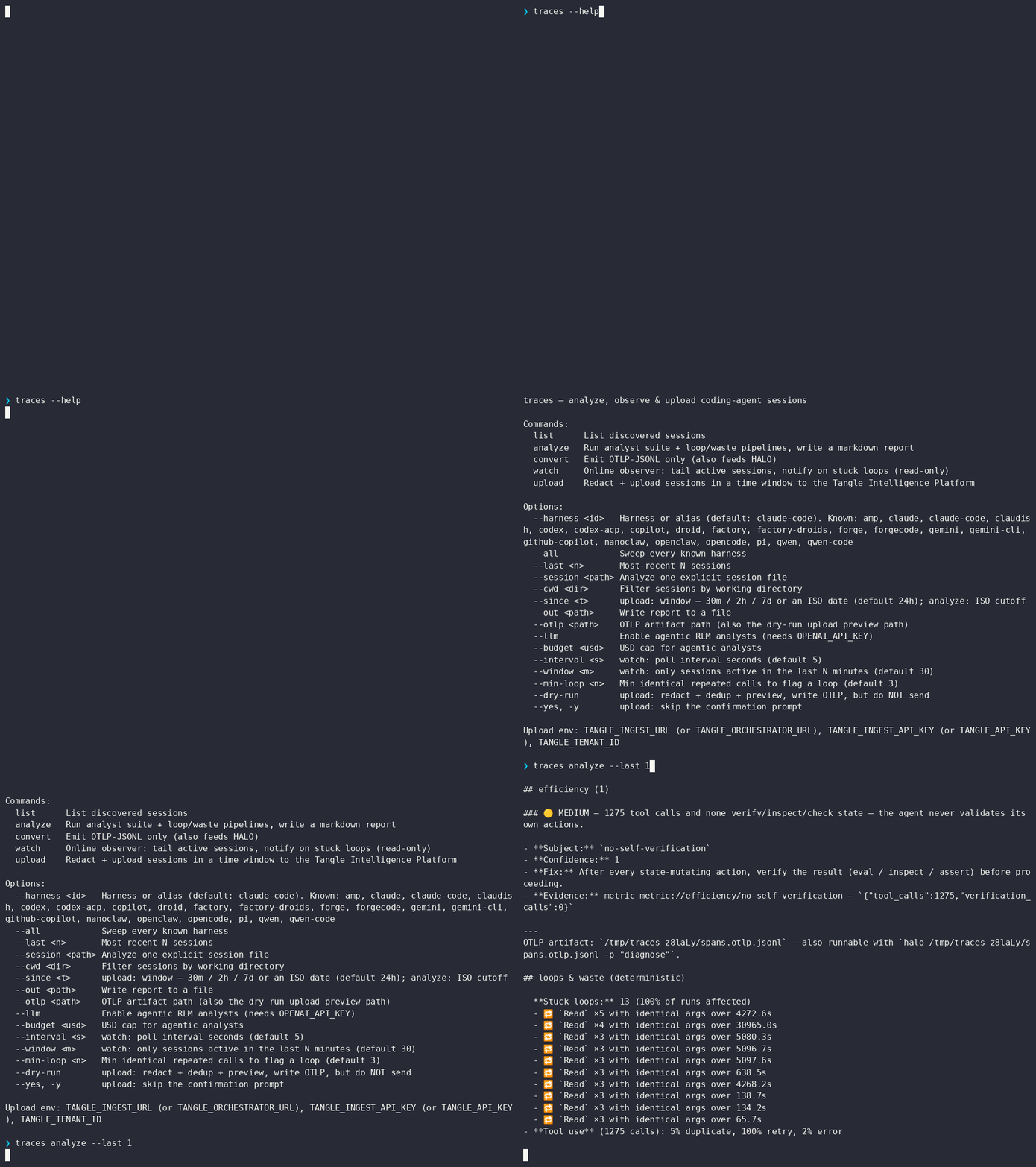


It reads the transcripts your harness leaves on disk, reconstructs the run as spans, and reports where the agent got stuck, burned tokens, or stopped checking its own work — locally, with no API key and no cost for the deterministic pass.
- Install
- Quick start
- What it finds
- Supported harnesses
- CLI reference
- Upload to the Intelligence Platform
- External engines (bring your own)
- Library (SDK)
- Examples
- Develop
npm i -g @tangle-network/traces     # the `traces` CLI
npx @tangle-network/traces analyze  # or run without installing
npm i @tangle-network/traces        # or use it as a library
Requires Node ≥ 22.
traces analyze --harness claude-code --last 1That's the command in the demo above. The deterministic pass — stuck loops, token growth, output decay, missing self-verification, tool monoculture — needs no API key and costs nothing.
Add --llm for the agentic analysts (failure-mode / knowledge-gap / knowledge-poisoning / improvement); they call OpenAI and respect --budget <usd>.
Every run also writes a canonical OpenInference JSONL artifact, so you can run external engines like HALO over it directly with --analyzer halo — see External engines. Analysis is never locked to one engine.
The deterministic pass (free, no key) surfaces:
| Finding | Meaning |
|---|---|
| Stuck loops | the same tool called N× with identical args and no state change |
| Monotonic input growth | full history re-sent every step — context never compressed |
| Output-length decay | planning/reasoning per step shrinking as context grows |
| No self-verification | state-mutating actions never followed by an eval/inspect/check |
| Tool monoculture / retry / error rates | the shape of how the agent actually spent its calls |
--llm adds agentic analysts that read the conversation and cluster higher-order failure and improvement signals.
"Verified" = tested against real sessions; "fixture" = tested against schema-accurate fixtures (no real sessions available).
| Harness (aliases) | Reads from | Status |
|---|---|---|
claude-code (claude, claudish, openclaw, nanoclaw) |
~/.claude/projects/<cwd>/*.jsonl (+ subagent sidechains) |
verified |
codex (codex-acp) |
~/.codex/sessions/**/rollout-*.jsonl |
verified |
opencode |
~/.local/share/opencode/storage/ |
verified |
gemini (gemini-cli) |
~/.gemini/tmp/<hash>/chats/session-*.json |
verified |
pi |
~/.pi/agent/sessions/<cwd>/*.jsonl |
verified |
factory (factory-droids, droid) |
~/.factory/sessions/<cwd>/*.jsonl + .settings.json sidecar |
locate verified, parse fixture |
qwen (qwen-code) |
~/.qwen/projects/<cwd>/chats/*.jsonl |
fixture |
amp |
~/.local/share/amp/threads/T-*.json |
fixture |
github-copilot (copilot) |
~/.copilot/session-state/<id>/events.jsonl |
fixture |
forge (forgecode) |
/dump JSON exports |
fixture |
Every adapter captures the full conversation — the user's prompt and the assistant's response text, plus tool calls/results and token usage. (github-copilot is the one exception: its log format carries no user prompt.) Factory stores token totals in .settings.json, not per turn. Forge reads /dump JSON exports (live SQLite is a follow-up). ACP-only bridges may not persist a local transcript.
traces list     --harness claude-code --last 20    # discover sessions
traces analyze  --harness codex --last 1           # $0 deterministic report
traces analyze  --all --since 2026-06-18 --out report.md
traces convert  --harness claude-code --last 1 --otlp spans.jsonl   # OTLP only
traces watch    --all                              # live observer; notify on stuck loops
traces upload   --since 1h --dry-run               # redact + dedup + preview, no network
traces upload --since 24h # upload last day to the Intelligence Platform| Flag | Meaning |
|---|---|
--harness <id> |
Harness or alias (default: claude-code) |
--all |
Every known harness |
--last <n> |
Most-recent N sessions |
--session <path> |
One explicit session file |
--cwd <dir> |
Filter by working directory |
--since <t> |
upload: window — 30m/2h/7d or ISO (default 24h); analyze: ISO cutoff |
--out <path> |
Write the report to a file |
--otlp <path> |
OTLP artifact path (also the dry-run upload preview) |
--llm / --budget <usd> |
Enable agentic analysts (needs OPENAI_API_KEY) / cap their spend |
--interval <s> / --window <m> |
watch: poll seconds (default 5) / active-session window minutes (default 30) |
--min-loop <n> |
Identical repeated calls before flagging a loop (default 3) |
--no-content |
upload: send metadata only — strip all prompt/response text |
--dry-run / --yes |
upload: preview without sending / skip the confirm prompt |
upload redacts locally before anything leaves the machine, dedups against already-uploaded sessions, and tags each with metadata (harness, cwd, git branch, host).
traces upload --since 24h --dry-run     # see exactly what would be sent — no network
traces upload --since 24h --no-content  # send metadata only — drop all prompt/response text
traces upload --since 24h               # send it
It needs TANGLE_INGEST_URL (or TANGLE_ORCHESTRATOR_URL), TANGLE_INGEST_API_KEY (or TANGLE_API_KEY), and TANGLE_TENANT_ID. Without them, --dry-run still works fully.
Redaction is best-effort regex for structured secrets and credentials: API keys, GitHub/cloud tokens, JWTs, bearer headers, private-key blocks, KEY=secret assignments, and credentials embedded in URLs. It runs over every span attribute, including the captured prompt/response text.
It does not catch free-form PII — names, postal addresses, phone numbers in prose — which needs a context-aware model. Three postures, strongest first:
--no-content— upload metadata only (tool calls, tokens, timing, loop signal); no prose leaves the machine.- Run an ML PII scrubber (e.g.
openai/privacy-filter) on the platform ingest side as defense-in-depth. - Default — regex redaction of structured secrets.
Always --dry-run first to see exactly what would be sent.
traces hosts analysis engines and PII scrubbers it does not bundle — you install the tool, traces drives it over a thin command adapter. Same pattern for any future engine or model.
Analyzers run over the emitted OTLP artifact as peers to the built-in analysts:
traces analyze --last 1 --analyzer halo                         # run HALO too
traces analyze --last 1 --analyzer halo --analyzer-prompt "find token waste"
traces analyze --last 1 --analyzer halo --analyzer my-engine    # repeatable
Our OTLP artifact is canonical OpenInference (top-level kind, resource, scope), so HALO reads it directly — no conversion. HALO runs its own LLM (OpenAI client — set OPENAI_BASE_URL / OPENAI_API_KEY, or use HALO's provider); --model is forwarded to it. traces supplies the trace and drives the CLI; it doesn't pay for or configure HALO's model.
Redactors scrub prompt/response prose with an external PII model (catching names/addresses the regex pass can't), running after the built-in redaction:
# the command reads a JSON array of strings on stdin, writes the scrubbed array on stdout
traces upload --since 24h --dry-run --redactor "my-pii-scrubber"
In the SDK these are the ExternalAnalyzer and Redactor interfaces (haloAnalyzer, commandAnalyzer, commandRedactor, applyRedactor, runExternalAnalyzers). See examples/external-engines.ts.
For the built-in agentic analysts (
--llm), setOPENAI_API_KEY— or point at any OpenAI-compatible gateway withOPENAI_BASE_URL(e.g. an internal router) to use a non-OpenAI key.
The CLI is a thin consumer of these exports.
| Export | Signature | Use |
|---|---|---|
analyzeSpans |
(spans, { registry?, ai?, budgetUsd? }) → AnalyzeResult |
run analysts — built-in, or your own via registry |
watchSessions |
(ObserverOptions) → Promise<void> |
live observer; onLoop / onReport / signal / adapters |
scanSessions |
(ScanOptions) → AsyncIterable<ScannedSession> |
the shared locate→parse iterator |
collectSessions |
(CollectOptions) → SessionBatch[] |
redacted per-session batches for your own pipeline |
redactSpans |
(spans, rules?) → { spans, report } |
PII/secret redaction (TRACES_REDACTION_RULES) |
planUpload / executeUpload |
(…, { backend? }) → … |
redact + dedup + send to any sink |
selectAdapters / listAdapters / resolveAdapter |
adapter selection + the harness registry | |
HarnessTraceAdapter |
interface (locate + parse) |
implement to add a harness |
ExternalAnalyzer / Redactor |
haloAnalyzer / commandAnalyzer / commandRedactor |
drive engines/models you install (not bundled) |
import { watchSessions, analyzeSpans, AnalystRegistry, makeFinding } from '@tangle-network/traces'

// Observe live sessions, feed findings anywhere (read-only, cancellable):
const c = new AbortController()
await watchSessions({ all: true, signal: c.signal, onLoop: (l) => alert(l.toolName, l.occurrences) })

// Run your own analyst instead of the built-ins:
const registry = new AnalystRegistry()
registry.register({
  id: 'mine', description: '…', inputKind: 'trace-store', cost: { kind: 'deterministic' }, version: '1.0.0',
  async analyze() {
    return [makeFinding({ analyst_id: 'mine', area: 'custom', claim: '…', severity: 'info', evidence_refs: [], confidence: 0.9 })]
  },
})
await analyzeSpans(spans, { registry })Runnable, in examples/:
| File | Shows |
|---|---|
observe-and-alert.ts |
tail live sessions and alert on stuck loops |
custom-analyst.ts |
register and run your own analyst |
custom-backend.ts |
redact + dedup + upload to your own sink |
register-harness.ts |
add a new harness by implementing HarnessTraceAdapter |
external-engines.ts |
drive HALO + an external PII scrubber you install yourself |
pnpm install
pnpm dev analyze --harness claude-code --last 1   # run from source via tsx
pnpm test
pnpm typecheck
pnpm build        # → dist/index.js (SDK) + dist/cli.js (bin) + .d.ts