A RuneLite plugin that enriches the in-game Examine action with a side panel of useful item info — quest usage, what the item makes, how it's made, and where it comes from.
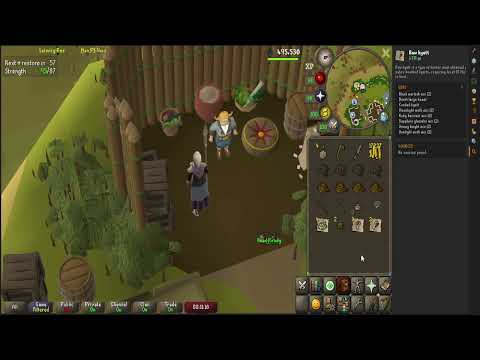

- Quest usage — which quests need the item, each flagged by your progress so ironmen can see at a glance what's safe to drop or alch
- Description (opt-in) — a one-line OSRS Wiki summary for items whose in-game examine text is unhelpful
- Uses (opt-in) — what the item is used to make; click a product to open its wiki page (e.g. Long kebbit spike → Long kebbit bolts)
- How to make (opt-in) — the item's own recipe: skill/level required, materials, and tool/facility
- Spawns · Shops · Drops (opt-in) — where to get it: ground spawns (click to pin and recenter the world map), shops, and monster drops with rates
| Setting | Description | Default |
|---|---|---|
| Open panel on examine | Auto-open the side panel when you examine an item | Off |
| Examine chat message | Print a short quest verdict to the chatbox on examine | On |
| Show item sources & info | Enables the wiki-sourced extras (description, Uses, How to make, Spawns/Shops/Drops). Submits your IP address to the OSRS Wiki, a third-party server not controlled or verified by RuneLite developers. | Off |